
Showing posts with label GSoC. Show all posts
Showing posts with label GSoC. Show all posts
Thursday, June 5, 2008
What about Inkscape?
I wanted to work on Inkscape this summer, at least a bit here and there. I was trying to help out a Summer of Code student for a while, but my expertise didn't lie as much in his project domain as we were hoping. Other than that, I really haven't had the chance. Or maybe I just haven't forced myself to make the time. Either way, I'm hoping that publicly writing about it might guilt me into ensuring that I fix at least a bug or two before September comes around. Fingers crossed.

Thursday, April 24, 2008
OSS Extravaganza
I decided to take a short break between coding and paper writing tonight, and work on setting up my "new" laptop (I bought Christian's old Alienware off of him after he mistakenly thought his cat destroyed it and bought a new one). I have both Windows and Ubuntu installed, though at the moment I am spending more time in Windows. I had some of my basic favorite programs installed already, so I went on an open source software rampage.
Some of the packages I downloaded I've used before (such as Inkscape, of course). But I also picked up some that I always wanted to try but never got around to, like Blender and Scribus. Just for fun, here's a full list of what I've got so far. Let me know if I've missed anything you deem to be essential.
I have to say that the world of free and open source software was pretty foreign to me before last year's Google Summer of Code. I didn't realize how high the quality of the software was! I also had a somewhat poor impression of the community from a few fanatics I ran into at school. It's nice to have learned that most people are pretty nice and normal -- as far as geeks go at least ;).
Some of the packages I downloaded I've used before (such as Inkscape, of course). But I also picked up some that I always wanted to try but never got around to, like Blender and Scribus. Just for fun, here's a full list of what I've got so far. Let me know if I've missed anything you deem to be essential.
I have to say that the world of free and open source software was pretty foreign to me before last year's Google Summer of Code. I didn't realize how high the quality of the software was! I also had a somewhat poor impression of the community from a few fanatics I ran into at school. It's nice to have learned that most people are pretty nice and normal -- as far as geeks go at least ;).
Monday, April 21, 2008
A Change in (Summer) Plans
I just received the unfortunate email from Google telling me I wasn't accepted into Summer of Code this year. I feel a little bit bad that 25% more students were accepted this year over last, yet I still didn't get in. The python head tracking project just didn't fit into their number of slots, and it's possible that the head honchos didn't see the benefit the work could have to the community. I know that there may not have been a mentor for me at Inkscape, and I did mention that I was going to be trying to contribute over the next while whether I got in on GSoC or not.
A fellow student applied for Inkscape to work on SVG Fonts. It turned out that his work was going to overlap with my plans of continuing font specification support. I changed my application last minute to include some other text improvements since I was pretty flexible, and his application was a lot harder to change. I don't actually know if this student got accepted, but my guess is that he did, given how desired his proposed work is. I'm hoping to be able to contribute to the conversation about the font specification side of things.
More than anything, I take this as a sign (some things are just meant to be, or not!). I will have much more time to work on my thesis now, and as a result I might be able to finish my Masters work early, allowing me to start on a PhD project while riding out the Masters funding. Furthermore, I should be able to keep a regular work-day schedule, opening up evenings and weekends for fun. It's been a while since I've really been able to do that, and to be honest, I'm really looking forward to it!
Finally, congratulations to everyone who made it into GSoC this year, and best of luck!
A fellow student applied for Inkscape to work on SVG Fonts. It turned out that his work was going to overlap with my plans of continuing font specification support. I changed my application last minute to include some other text improvements since I was pretty flexible, and his application was a lot harder to change. I don't actually know if this student got accepted, but my guess is that he did, given how desired his proposed work is. I'm hoping to be able to contribute to the conversation about the font specification side of things.
More than anything, I take this as a sign (some things are just meant to be, or not!). I will have much more time to work on my thesis now, and as a result I might be able to finish my Masters work early, allowing me to start on a PhD project while riding out the Masters funding. Furthermore, I should be able to keep a regular work-day schedule, opening up evenings and weekends for fun. It's been a while since I've really been able to do that, and to be honest, I'm really looking forward to it!
Finally, congratulations to everyone who made it into GSoC this year, and best of luck!
Saturday, April 5, 2008
Inkscape Author
The newest release of Inkscape - 0.46 - is out, and I am excited to be an official author! This marks the very first piece of software that has actually listed my name in the about window (past companies I worked at didn't have an author's list). It's a good feeling.

(My name is third from the top. It's out of alphabetical order because it was originally under my maiden name Banaszkiewicz.)

(My name is third from the top. It's out of alphabetical order because it was originally under my maiden name Banaszkiewicz.)
Sunday, March 30, 2008
Summer of Code: A New Twist
I wrote a few weeks ago about the summer of coding fun that surely lies ahead. I outlined my desire to "continue the quest of supporting non-CSS fonts in Inkscape" and discussed the limitations that some aspects of the Pango font management system have, and how they were preventing Inkscape from using all available fonts. I recently submitted an application that outlined my potential summer, starting with the legalization of flowed text (deemed a priority by some senior community members) and then continuing with research into solutions to the fancy font problem. So if all goes well and I am accepted, then I could have another summer full of text fun.
But wait... there's more!
The twist is that I now have another interesting project to apply for this summer. My friend Christian, who after participating as a student in three summers of code has decided he should mentor this time around, recently worked on using the Wii remote for head tracking for molecular visualization, and then on alternate means of doing the tracking, such as using face recognition. He wants several aspects of his project, dubbed MolViz, to be refined and then used by the wider Python community. You can find more information about that on the Python Software Foundation's GSoC ideas page.
The interest I have in this project revolves around one of my favorite topics of late - augmented reality! I would like to implement a new mode of head tracking, using augmented reality markers attached to a user's forehead. This method is cheaper than using a Wii remote in that one need only print out a simple pattern and attach it to their head, yet more accurate in real time than face recognition would be. Python programmers could greatly benefit from such a head tracking option for applications that need to work quickly but have a high degree of accuracy and consistency, such as games.
So I went ahead and applied for this project, too.
The truth is that I would love to work on both projects, but the possibility of not working on Inkscape admittedly feels strange, almost guilt-ridden. So I have vowed to myself that, after GSoC is done, I will try to keep up with open source development by working on Inkscape at least once a week. I have had such goals in the past but was never able to reach them, thanks to heavy course loads and so on. However, for the next 4-16 months (however long it takes), I will be working on my thesis, so I should finally have maximum levels of flexibility for a while. With this in mind, I choose to specifically not hope for one project or the other, but wait and see what happens.
But wait... there's more!
The twist is that I now have another interesting project to apply for this summer. My friend Christian, who after participating as a student in three summers of code has decided he should mentor this time around, recently worked on using the Wii remote for head tracking for molecular visualization, and then on alternate means of doing the tracking, such as using face recognition. He wants several aspects of his project, dubbed MolViz, to be refined and then used by the wider Python community. You can find more information about that on the Python Software Foundation's GSoC ideas page.
The interest I have in this project revolves around one of my favorite topics of late - augmented reality! I would like to implement a new mode of head tracking, using augmented reality markers attached to a user's forehead. This method is cheaper than using a Wii remote in that one need only print out a simple pattern and attach it to their head, yet more accurate in real time than face recognition would be. Python programmers could greatly benefit from such a head tracking option for applications that need to work quickly but have a high degree of accuracy and consistency, such as games.
So I went ahead and applied for this project, too.
The truth is that I would love to work on both projects, but the possibility of not working on Inkscape admittedly feels strange, almost guilt-ridden. So I have vowed to myself that, after GSoC is done, I will try to keep up with open source development by working on Inkscape at least once a week. I have had such goals in the past but was never able to reach them, thanks to heavy course loads and so on. However, for the next 4-16 months (however long it takes), I will be working on my thesis, so I should finally have maximum levels of flexibility for a while. With this in mind, I choose to specifically not hope for one project or the other, but wait and see what happens.
Sunday, March 9, 2008
Summer Coding Fun Ahead
This year's Google Summer of Code official announcement has come and gone. Would-be participating open source organizations are applying in a flurry to be one of the relative few that will become mentors to hundreds of students this summer. And me? I'm hoping to propose more work on Inkscape's text tool to go with what I did last summer.
In particular, I would very much like to continue the quest of supporting non-CSS fonts in Inkscape. In the current build, I have an extra custom CSS attribute added to text elements that holds the full name of the font used. Without this, font information can be lost, since CSS can store a font family and only a limited number of style and type attributes. Fancy font variants will have style and type values that simply can't be represented, and so some generic alternative will be used. Other than the obvious problem of dumbing down more interesting fonts, you can imagine that the general style and type defaults might not even exist for this family, making it completely unusable.
So we store the whole font name to ensure that no information is lost. Unfortunately, Inkscape internally makes use of the Pango font system, which seems to - you guessed it - only support fonts that CSS can support. Fonts are represented in memory with Pango structures, and the system is fairly heavily intertwined with Inkscape font code. I would not suggest removing Pango from the Inkscape equation, so this leaves me with one choice: see if we can expand Pango to include a bigger variety of fonts!
I have contacted the Pango folks on their mailing list, and am awaiting their reply. I am trying to find out whether this expansion would be desirable for Pango. For all I know, there could be some philosophical or even technical barriers to doing it. If I get some good news back, I would like to propose working on this expansion during this year's Summer of Code. Ultimately, this would mean being able to support some cool fonts in Inkscape.
I will let you know what happens!
In particular, I would very much like to continue the quest of supporting non-CSS fonts in Inkscape. In the current build, I have an extra custom CSS attribute added to text elements that holds the full name of the font used. Without this, font information can be lost, since CSS can store a font family and only a limited number of style and type attributes. Fancy font variants will have style and type values that simply can't be represented, and so some generic alternative will be used. Other than the obvious problem of dumbing down more interesting fonts, you can imagine that the general style and type defaults might not even exist for this family, making it completely unusable.
So we store the whole font name to ensure that no information is lost. Unfortunately, Inkscape internally makes use of the Pango font system, which seems to - you guessed it - only support fonts that CSS can support. Fonts are represented in memory with Pango structures, and the system is fairly heavily intertwined with Inkscape font code. I would not suggest removing Pango from the Inkscape equation, so this leaves me with one choice: see if we can expand Pango to include a bigger variety of fonts!
I have contacted the Pango folks on their mailing list, and am awaiting their reply. I am trying to find out whether this expansion would be desirable for Pango. For all I know, there could be some philosophical or even technical barriers to doing it. If I get some good news back, I would like to propose working on this expansion during this year's Summer of Code. Ultimately, this would mean being able to support some cool fonts in Inkscape.
I will let you know what happens!
Friday, November 30, 2007
Geek Envy
I recently received my Google Summer of Code t-shirt in the mail. Here are a couple of photos showing its awesomeness:


In related news from the Why Google Is So Well Loved department, I also received some swag for my Women in CS event coming up in December. I got enough umbrellas and sticky notepads for everyone who signed up (and for my guest speaker), and a few really nice mugs that I will probably draw names for. All of this has the Google women's logo, which I have never personally even seen before, making it rare in my eyes, and all the more special. I am certain that everyone who attends our event in a couple of weeks is going to love this stuff!


In related news from the Why Google Is So Well Loved department, I also received some swag for my Women in CS event coming up in December. I got enough umbrellas and sticky notepads for everyone who signed up (and for my guest speaker), and a few really nice mugs that I will probably draw names for. All of this has the Google women's logo, which I have never personally even seen before, making it rare in my eyes, and all the more special. I am certain that everyone who attends our event in a couple of weeks is going to love this stuff!

Monday, August 20, 2007
Summer of Code: Final Report
Today is the official end of the Google Summer of Code program. I've been both excited and nervous about the culmination of three months' worth of work on this judgment day. But no sense in worrying any longer; I will find out soon enough if I am to receive the coveted t-shirt and very useful final payment.
Here, I would like to share a summary of everything that I've done this summer for Inkscape. A written summary is made even more crucial by the nature of what I did in the second half of the program. While I laid down an important foundation for changes that can now be made much easier in the near future, there is not as much for the user to see quite yet.
Many of you already know my midterm impressions. As a quick reminder, during the first half of the summer, I implemented support for the <tref> element, as laid out in the SVG specification. This will let you use any character data from within the document in your own <text>, and as a bonus, any character markup from the original text will be ignored so you can easily add your own. You can't quite do this with <use>.
The work done in the second half is notably more complicated to explain. The end goal was initially twofold:
What do I mean by the "current state of Pango" you ask? Well, as it turns out, the structure that is fundamental to our use of Pango, the PangoFontDescription, will only describe fonts that fit into the confines of CSS. So until the good folks at Pango decide to expand on what Pango can represent, we're stuck with what it already supports. (And yes, a little later on, I do plan on speaking with these good folks to find out why it is the way it is, and try to offer a helping hand to enhance it if that's what makes sense.)
But even if the PangoFontDescription did support what CSS can't, that doesn't really help us, right? After all, our SVG files use CSS to describe the fonts we're using anyway. That is true, and that's why I am adding a new attribute to an object's style string: -inkscape-font-specification. Here we will store a string that can fully represent a font no matter what its face is. The CSS will be updated as best it can be and used if there is no font specification available.
As for the second goal of cleaning up the family and style lists, the framework that makes this possible is in place, and only the code for converting the full font specification strings into the desired family and style for the UI needs to be set up. A fellow summer of coder has written code that may be appropriate for this, so after the deadline his code can be evaluated and re-purposed for this use. Everything should work well with only some possible minor tweaking.
So what does the user get to enjoy as a result of this work? Gone are the days of duplicate styles in the UI and styles that seem selectable but that just can't be used. Those fonts that Pango cannot handle aren't even listed, and those that just needed a little extra help now work. That means that every style listed in the Text and Styles dialog is now selectable! Hurray!
In conclusion, though it may not seem terribly exciting on the surface, this portion of my project has unlocked the door for some really great changes to be made in the very near future. Look forward to a more desirable grouping of families first, and hopefully we can get Pango to do for us what we really want next: support ALL fonts!
Here, I would like to share a summary of everything that I've done this summer for Inkscape. A written summary is made even more crucial by the nature of what I did in the second half of the program. While I laid down an important foundation for changes that can now be made much easier in the near future, there is not as much for the user to see quite yet.
Many of you already know my midterm impressions. As a quick reminder, during the first half of the summer, I implemented support for the <tref> element, as laid out in the SVG specification. This will let you use any character data from within the document in your own <text>, and as a bonus, any character markup from the original text will be ignored so you can easily add your own. You can't quite do this with <use>.
The work done in the second half is notably more complicated to explain. The end goal was initially twofold:
- Many fonts used in professional design can not be represented within the constraints of CSS. Take a font with a Shadow variant, such as Gill Sans, as an example -- there is no way to describe Gill Sans Shadow with CSS, as you can see in the CSS2 Spec. By adding our own Inkscape-specific information, we hoped to be able to use fonts like these at least within Inkscape.
- When it comes to listing font families and faces (aka styles) in our UI, we use Pango's answer to the question "which part of this font name is the family?" Unfortunately, this does not always lead to an ideal situation. What often happens is that several different faces that should be grouped together in the same family aren't. For example, you might see "Futura Bk BT", "Futura Hv BT", and "Futura Lt BT" listed as separate families, but would rather they were grouped together. We wanted to customize this process so we could control how families and styles were grouped together.
What do I mean by the "current state of Pango" you ask? Well, as it turns out, the structure that is fundamental to our use of Pango, the PangoFontDescription, will only describe fonts that fit into the confines of CSS. So until the good folks at Pango decide to expand on what Pango can represent, we're stuck with what it already supports. (And yes, a little later on, I do plan on speaking with these good folks to find out why it is the way it is, and try to offer a helping hand to enhance it if that's what makes sense.)
But even if the PangoFontDescription did support what CSS can't, that doesn't really help us, right? After all, our SVG files use CSS to describe the fonts we're using anyway. That is true, and that's why I am adding a new attribute to an object's style string: -inkscape-font-specification. Here we will store a string that can fully represent a font no matter what its face is. The CSS will be updated as best it can be and used if there is no font specification available.
As for the second goal of cleaning up the family and style lists, the framework that makes this possible is in place, and only the code for converting the full font specification strings into the desired family and style for the UI needs to be set up. A fellow summer of coder has written code that may be appropriate for this, so after the deadline his code can be evaluated and re-purposed for this use. Everything should work well with only some possible minor tweaking.
So what does the user get to enjoy as a result of this work? Gone are the days of duplicate styles in the UI and styles that seem selectable but that just can't be used. Those fonts that Pango cannot handle aren't even listed, and those that just needed a little extra help now work. That means that every style listed in the Text and Styles dialog is now selectable! Hurray!
In conclusion, though it may not seem terribly exciting on the surface, this portion of my project has unlocked the door for some really great changes to be made in the very near future. Look forward to a more desirable grouping of families first, and hopefully we can get Pango to do for us what we really want next: support ALL fonts!
Monday, July 9, 2007
Summer of Code: Halfway Through
Midterm evaluations begin today for Google's Summer of Code program, so what better time than now to reflect on the program so far? Here I hope to give some insight into my progress thus far, why it is thus, and where I feel I stand. This will inevitably provide a good idea of my impressions on open source up to this point, albeit indirectly.
Back at the end of May, the official program start, my plan was to write up a tutorial on how to use Eclipse on Windows to debug Inkscape, tackle a quick bug from a list my mentor provided, then move on to some of the work that was contained in my application proposal. I never expected to have that bug take me to the middle of the program. I am certainly not new to large software projects, so it has been interesting to experience such a steep learning curve.
Despite my relatively slow progress, I can say that I have learned much in the process. I have discovered both how some of Inkscape’s general architecture works, and the basic workings of the code that handles text. I feel very well equipped to tackle my next task with an efficiency and grace that would not have been possible had I jumped into it head first back in May.
More importantly, I have a genuine desire to stick around after the summer. There would be no sense in whipping up some fast and dirty code just to get paid by Google and then move on. Therefore, I try to look at the time spent thus far as an investment.
(By the way, the bug I’m referring to is really more of a small feature. I’m adding support for the tref element, as you may have read about in an earlier post about some frustrations encountered.)
There are several factors that I feel have hindered my progress. These are things that I have personally taken some time to get used to, not necessarily inherent flaws in the way Inkscape is built or managed. In fact, some of these issues are a direct result of working with Windows when the code is much better suited to development in Linux.
Builds Take Forever
Even if I change just one line of code, I have to wait ten minutes to rebuild the code. This is incredibly frustrating and a huge time waster. Often, I can’t move on to work on the next thing while waiting because I don’t know what the next thing is going to be before I try the code I am building for in the first place. Especially when just learning the code, I find myself needing to experiment with different one line changes constantly. Perhaps I wouldn’t need to do this so often if the next issue – debugging – were non-existent.
Debugging Stinks
Stepping through code, watching variables, breaking on assertions – this is the sort of thing that can really speed up the learning process for a new piece of software. I wasn’t too enthusiastic about debugging with gdb on the command line, so I very fortunately managed to set up Eclipse to debug using the CDT plugin. This essentially gives a GUI front end to gdb. (I’ll note that this took some fighting back in March when I was getting my Summer of Code application together. Others were also having a hard time setting it up; this is why I spent the first few days of the program writing a tutorial about it.)
Now, I don’t know if it’s gdb or simply Eclipse’s use of it, but debugging in this manner is very flaky. In debug mode, I can’t open files (though this has been proven to happen on the command line as well). Breakpoints often won’t work unless they are set before the application is launched. While stepping through code, the lines being executed seem to jump backwards a line or two unexpectedly. The debugger doesn’t break on crashes and can’t be arbitrarily suspended. Sometimes the application just doesn’t feel like launching. And these are just the issues I can remember!
Documentation is Thin
Not a big surprise here, though more up to date documentation would be nice. Assuming that I just haven’t been too dumb to find it. ;)
Online Communication Can Be Tricky
I have to admit that the fully online nature of the project has been difficult to adjust to. I tend to try to figure things out myself in the early stages of a new project. I find this to be a very effective philosophy and helps me learn the basics in a way that they will stick in my mind long-term. Still, there are times when a quick question to a team member can clear things up very quickly. The only problem is, when questions can only be asked online, asking isn’t always fast.
I’ve often preferred communication via the written word. It gives you an opportunity to think out what you want to say. However, there are times when sitting in front of a screen with another person is invaluable. If I don’t know the correct or recognizable terminology for something, for example, I can just point at the code instead of describe it. We can watch the behaviour of the running software at the same time and talk about it realtime. We can even sketch little diagrams to explain what we’re talking about. Some of this sort of thing can be done online, but it is impersonal and often cumbersome.
Another thing I really miss is weekly team meetings. Sure, they don’t seem so great while you are waiting for them to end, but hearing about other peoples’ problems and the technical discussion that often follows can be really beneficial. Some of this comes through in emails sent to the team, as it does in an online-only community, but you get something extra with in-person meetings it seems.
As with all things, it’s much easier to state what’s wrong than what’s right. There are some aspects of this kind of work that I really like. Working from home has its challenges, but it is darned nice to avoid the half hour commute to work in the morning. It’s also pretty amazing to see how well people can make friends online, without possibly ever meeting each other. There is a real sense of community.
I was fortunate enough to meet some developers in person at Libre Graphics Meeting, which made the comradery more real for me. I also try to make myself visible in the community, participating in pertinent mailing list discussions and helping users on the IRC channel.
Given all of this, where do I stand? I’m not sure how well I’ve performed compared to the other Summer of Code students in terms of actual code produced, but I have felt fairly productive in terms of learning. I’m hoping I will feel as fast the second half of the summer as I felt slow during the first half.
No matter what happens, if I can finish the summer with a prestigious Summer of Code t-shirt and a fun open source project to work on, I will be a happy programmer.
Back at the end of May, the official program start, my plan was to write up a tutorial on how to use Eclipse on Windows to debug Inkscape, tackle a quick bug from a list my mentor provided, then move on to some of the work that was contained in my application proposal. I never expected to have that bug take me to the middle of the program. I am certainly not new to large software projects, so it has been interesting to experience such a steep learning curve.
Despite my relatively slow progress, I can say that I have learned much in the process. I have discovered both how some of Inkscape’s general architecture works, and the basic workings of the code that handles text. I feel very well equipped to tackle my next task with an efficiency and grace that would not have been possible had I jumped into it head first back in May.
More importantly, I have a genuine desire to stick around after the summer. There would be no sense in whipping up some fast and dirty code just to get paid by Google and then move on. Therefore, I try to look at the time spent thus far as an investment.
(By the way, the bug I’m referring to is really more of a small feature. I’m adding support for the tref element, as you may have read about in an earlier post about some frustrations encountered.)
There are several factors that I feel have hindered my progress. These are things that I have personally taken some time to get used to, not necessarily inherent flaws in the way Inkscape is built or managed. In fact, some of these issues are a direct result of working with Windows when the code is much better suited to development in Linux.
Builds Take Forever
Even if I change just one line of code, I have to wait ten minutes to rebuild the code. This is incredibly frustrating and a huge time waster. Often, I can’t move on to work on the next thing while waiting because I don’t know what the next thing is going to be before I try the code I am building for in the first place. Especially when just learning the code, I find myself needing to experiment with different one line changes constantly. Perhaps I wouldn’t need to do this so often if the next issue – debugging – were non-existent.
Debugging Stinks
Stepping through code, watching variables, breaking on assertions – this is the sort of thing that can really speed up the learning process for a new piece of software. I wasn’t too enthusiastic about debugging with gdb on the command line, so I very fortunately managed to set up Eclipse to debug using the CDT plugin. This essentially gives a GUI front end to gdb. (I’ll note that this took some fighting back in March when I was getting my Summer of Code application together. Others were also having a hard time setting it up; this is why I spent the first few days of the program writing a tutorial about it.)
Now, I don’t know if it’s gdb or simply Eclipse’s use of it, but debugging in this manner is very flaky. In debug mode, I can’t open files (though this has been proven to happen on the command line as well). Breakpoints often won’t work unless they are set before the application is launched. While stepping through code, the lines being executed seem to jump backwards a line or two unexpectedly. The debugger doesn’t break on crashes and can’t be arbitrarily suspended. Sometimes the application just doesn’t feel like launching. And these are just the issues I can remember!
Documentation is Thin
Not a big surprise here, though more up to date documentation would be nice. Assuming that I just haven’t been too dumb to find it. ;)
Online Communication Can Be Tricky
I have to admit that the fully online nature of the project has been difficult to adjust to. I tend to try to figure things out myself in the early stages of a new project. I find this to be a very effective philosophy and helps me learn the basics in a way that they will stick in my mind long-term. Still, there are times when a quick question to a team member can clear things up very quickly. The only problem is, when questions can only be asked online, asking isn’t always fast.
I’ve often preferred communication via the written word. It gives you an opportunity to think out what you want to say. However, there are times when sitting in front of a screen with another person is invaluable. If I don’t know the correct or recognizable terminology for something, for example, I can just point at the code instead of describe it. We can watch the behaviour of the running software at the same time and talk about it realtime. We can even sketch little diagrams to explain what we’re talking about. Some of this sort of thing can be done online, but it is impersonal and often cumbersome.
Another thing I really miss is weekly team meetings. Sure, they don’t seem so great while you are waiting for them to end, but hearing about other peoples’ problems and the technical discussion that often follows can be really beneficial. Some of this comes through in emails sent to the team, as it does in an online-only community, but you get something extra with in-person meetings it seems.
***
As with all things, it’s much easier to state what’s wrong than what’s right. There are some aspects of this kind of work that I really like. Working from home has its challenges, but it is darned nice to avoid the half hour commute to work in the morning. It’s also pretty amazing to see how well people can make friends online, without possibly ever meeting each other. There is a real sense of community.
I was fortunate enough to meet some developers in person at Libre Graphics Meeting, which made the comradery more real for me. I also try to make myself visible in the community, participating in pertinent mailing list discussions and helping users on the IRC channel.
Given all of this, where do I stand? I’m not sure how well I’ve performed compared to the other Summer of Code students in terms of actual code produced, but I have felt fairly productive in terms of learning. I’m hoping I will feel as fast the second half of the summer as I felt slow during the first half.
No matter what happens, if I can finish the summer with a prestigious Summer of Code t-shirt and a fun open source project to work on, I will be a happy programmer.
Tuesday, June 19, 2007
The Dangers of Copying
When I'm first learning a code base, I often make use of existing code, using it as an example to help speed things up. I don't do this blindly, of course -- that would probably result in many more problems than its worth. Still, it can be easy to fall into the trap of taking the example code as ground truth.
This happened to me yesterday while working on Inkscape. I'm adding new support for the SVG element <tref>. Because this element is similar in concept to <use> in that both refer to other elements, I have been looking at the code for <use> as my model.
I needed a class to represent the link between the <tref> object and what it refers to. The <use> element simply subclasses URIReference to accomplish this, so I made a new subclass for my purposes, initially just duplicating the <use> version. When I tried to build the code, I got a linker error telling me there was no virtual table defined for my new class.
Cursing and hair pulling may or may not have followed.
Finally, I looked up URIReference to see what it had to say about the matter. Lo and behold, the function being overridden had a slightly different signature. There was an extra const in the parameter list in the <use> version. Removing it from my class solved all my problems. Sigh...
Why the code compiles and links properly with the extra const in the <use> rendition of the subclass, but not in mine, I will never know. But let this be a reminder to be wary of the dangers of using existing code as your example. Look around elsewhere in the code base and remember to question everything.
This happened to me yesterday while working on Inkscape. I'm adding new support for the SVG element <tref>. Because this element is similar in concept to <use> in that both refer to other elements, I have been looking at the code for <use> as my model.
I needed a class to represent the link between the <tref> object and what it refers to. The <use> element simply subclasses URIReference to accomplish this, so I made a new subclass for my purposes, initially just duplicating the <use> version. When I tried to build the code, I got a linker error telling me there was no virtual table defined for my new class.
Cursing and hair pulling may or may not have followed.
Finally, I looked up URIReference to see what it had to say about the matter. Lo and behold, the function being overridden had a slightly different signature. There was an extra const in the parameter list in the <use> version. Removing it from my class solved all my problems. Sigh...
Why the code compiles and links properly with the extra const in the <use> rendition of the subclass, but not in mine, I will never know. But let this be a reminder to be wary of the dangers of using existing code as your example. Look around elsewhere in the code base and remember to question everything.
Friday, June 1, 2007
Women in Open Source II
My previous post, Women in Open Source, received an interesting comment just hours after I wrote it. The commenter Chris suggested that my thoughts on the issues preventing more women from entering open source were perhaps sexist and too stereotypical. In fact, this is probably true, and is why I even wrote the piece in the first place.
We live in a politically correct world where certain issues have become taboo. It seems that many are somehow afraid to bring up the inherent differences between men and women lest they come across as sexist. Sometimes, this can be a good thing, but sometimes it can do a great disservice. After all, according to the studies, treating everyone in an open source community the same, without considering gender, is one reason that women don't get involved.
So where are these 'studies' anyway? Well, Chris pointed me to a project called Free/Libre/Open Source Software: Policy Support. Linked to from this home page, I started to read their first listed deliverable, D16 - Gender: Integrated Report of Findings. After reading through the Executive Summary, I came to realize that this report was essentially saying the same things I did, just in fancier words.
The opening paragraph of the key findings reads:
Let's examine two of the key findings. (The others are equally as interesting and relate to what Chris said in his comment, but are less directly associated with my previous post.)
And now for a couple of key recommendations.
It should be fairly obvious by now that this report supports the ideas from my previous post. Social interaction and a good working environment do matter to women, and is one aspect that has been keeping women away from open source development. Furthermore, not realizing the importance of this issue because the sexism card might be played can clearly cause more damage to the open source industry than good. After all, it seems that everyone agrees -- open source needs more women!
We live in a politically correct world where certain issues have become taboo. It seems that many are somehow afraid to bring up the inherent differences between men and women lest they come across as sexist. Sometimes, this can be a good thing, but sometimes it can do a great disservice. After all, according to the studies, treating everyone in an open source community the same, without considering gender, is one reason that women don't get involved.
So where are these 'studies' anyway? Well, Chris pointed me to a project called Free/Libre/Open Source Software: Policy Support. Linked to from this home page, I started to read their first listed deliverable, D16 - Gender: Integrated Report of Findings. After reading through the Executive Summary, I came to realize that this report was essentially saying the same things I did, just in fancier words.
The opening paragraph of the key findings reads:
Listed below are the factors significant in excluding women from F/LOSS communities. These factors are nearly all underwritten by a central cultural dynamic within F/LOSS. F/LOSS participants, as in most scientific cultures, view technology as an autonomous field, separate from people. This means that anything they interpret as ‘social’ is easily dismissed as ‘artificial’ social conditioning. Because this ‘conditioning’ is considered more or less arbitrary, in their view it is supposed to be easily cast aside by individuals choosing to ignore it. F/LOSS also has a deeply voluntarist ethos which values notions of individual autonomy and volition. As a result participants largely do not believe that gender has anything to do with their own individual actions. The situation is thereby perpetuated in spite of the expressed desire for change.Here is the first hint that the issue is highly related to the social aspects of open source communities. Notice that the culture underlying the communities is described as having a lack of any real social environment, since anything considered social is simply cast away and ignored. This quote also implicitly tells us that the social aspects of the community are indeed important to women.
Let's examine two of the key findings. (The others are equally as interesting and relate to what Chris said in his comment, but are less directly associated with my previous post.)
F/LOSS communities actively perpetuate a ‘hacker’ ethic, which situates itself outside the ‘mainstream’ sociality, but equates women with that mainstream. Women are treated as either alien Other or (in online contexts) are assumed to be male and thus made invisible. Women are seen as innately more able to organise, communicate and negotiate among F/LOSS projects as well as with the outside world. Thereby they become carriers of sociality that is seen in a contrast to the 'technical' realm ascribed to men. Additionally F/LOSS women receive a high level of attention due to their gender which decreases their feeling of acceptance as community members as well as their willingness to further engage with the community.I feel that this finding correlates nicely with my earlier notion that even when a satisfactory social environment might exist, women may not be able to come to realize it. Nobody wants to feel like an outsider, yet becoming invisible isn't going to facilitate the social interaction most women seem to desire.
The reliance on long hours of intensive computing in writing successful code means that men, who in general assume that time outside of waged labour is ‘theirs’, are freer to participate than women, who normally still assume a disproportionate amount of domestic responsibilities. Female F/LOSS participants, however, seem to be able to allocate a disproportionate larger share of their leisure time for their F/LOSS activities. This gives an indication that women who are not able to spend as much time on voluntary activities have difficulties to integrate into the community.This one touches upon what I was saying about women not generally wanting to come home from work and continue programming. Interestingly, this point seems to suggest that it is the domestic responsibilities, whether perceived or real, that make women feel they don't have enough free time to contribute effectively to open source projects. I figured that women simply wanted to take on activities outside of technology moreso than men, and maybe this gives a possible reason why. If women have been responsible for certain aspects of home life for many centuries, then it is not hard to believe that they would feel even today that they did not 'own' their free time in the same way as men, even if in modern times these responsibilities don't always exist.
And now for a couple of key recommendations.
Provide tangible resources to help women devote time to their F/LOSS activities. This means both funding helping women to take part at specific F/LOSS events, as well as continuous support to enable women to take part in F/LOSS projects over a longer period of time.Women would probably feel less like they are interfering with life outside of their careers when developing for open source if they had, say, financial resources. Funding for attending conferences would help increase face to face social opportunities.
The European Commission, and EU Governments should use their commissioning role to encourage a greater variety of working methods in the production of software.These methods could include ways that boost the social interaction of community members. For instance, web cast meetings might be considered, and when feasible, more in-person encounters.
It should be fairly obvious by now that this report supports the ideas from my previous post. Social interaction and a good working environment do matter to women, and is one aspect that has been keeping women away from open source development. Furthermore, not realizing the importance of this issue because the sexism card might be played can clearly cause more damage to the open source industry than good. After all, it seems that everyone agrees -- open source needs more women!
Thursday, May 31, 2007
Women in Open Source
The discussion started with one simple stat: only 4% of Summer of Code participants are women. Comments suggest that the numbers for open source software in general are even worse and that, although not ideal, the field of computer science in general does seem to be doing somewhat better. The question posed was simply this: why are women interested in development shying away from open source in particular?
My first thought on this was that women tend to appreciate social contact. And I'm going to guess that this means face to face, bona fide real-life interaction, not just the virtual variety. There seem to be relatively few opportunities to meet other members of an open source project's community other than the occasional conference. Would most women enjoy working with people they've never met, knowing only their online personalities?
A timely technology news update from ACM included an article about why there aren't more women working in high-tech in general. Sadly, I can't find the article now, but the main point was that many women are turned off by the working environments found in most high tech places. With open source development largely happening online only, it goes without saying that there isn't much of an 'environment' at all. No lunches with coworkers, no fun days, and no jokes during team meetings. It is also possible that the virtual environment created by the community would be suitable, but that women aren't able connect to their fellow developers in a meaningful enough fashion to discover this. This comes back to the whole social contact thing.
Finally, ask yourself which gender is more likely to come home after a long day of work (possibly of coding) and fire up the laptop to scratch that burning itch by working on some project that doesn't result in any kind of financial gain. You're picturing a guy, aren't you? Even women without families seem to enjoy taking on activities that have nothing to do with work during the evenings and weekends. It's not that they didn't enjoy the programming they did during the day; it's just that there are so many other things to get done after the steam whistle has sounded.
I know I can relate to each of these three issues myself. I definitely appreciate the social aspects of a regular job. I always look forward to fun days out of the office, and getting together with coworkers over lunch. Heck, I even enjoy meetings because of the opportunity to interact with others! I have found that even regular high-tech companies can often fail to satisfy my social needs - too many employees don't tend to want to do anything except work on their piece of the project. And yes, these tend to be the males!
Having said that, however, I can also say that I can enjoy working on my own as well. So far, I don't mind the 'reclusiveness' of open source too much; I guess we'll have to see what my feelings are at the end of an entire summer of doing it. I can absolutely see myself contributing beyond the Summer of Code, but I could never put in the huge amounts of time into open source (or any coding project) that I see some guys doing. After all, I have to save time for laundry, gardening, motorcycling, taekwondo, yoga, snowboarding, ...
My first thought on this was that women tend to appreciate social contact. And I'm going to guess that this means face to face, bona fide real-life interaction, not just the virtual variety. There seem to be relatively few opportunities to meet other members of an open source project's community other than the occasional conference. Would most women enjoy working with people they've never met, knowing only their online personalities?
A timely technology news update from ACM included an article about why there aren't more women working in high-tech in general. Sadly, I can't find the article now, but the main point was that many women are turned off by the working environments found in most high tech places. With open source development largely happening online only, it goes without saying that there isn't much of an 'environment' at all. No lunches with coworkers, no fun days, and no jokes during team meetings. It is also possible that the virtual environment created by the community would be suitable, but that women aren't able connect to their fellow developers in a meaningful enough fashion to discover this. This comes back to the whole social contact thing.
Finally, ask yourself which gender is more likely to come home after a long day of work (possibly of coding) and fire up the laptop to scratch that burning itch by working on some project that doesn't result in any kind of financial gain. You're picturing a guy, aren't you? Even women without families seem to enjoy taking on activities that have nothing to do with work during the evenings and weekends. It's not that they didn't enjoy the programming they did during the day; it's just that there are so many other things to get done after the steam whistle has sounded.
I know I can relate to each of these three issues myself. I definitely appreciate the social aspects of a regular job. I always look forward to fun days out of the office, and getting together with coworkers over lunch. Heck, I even enjoy meetings because of the opportunity to interact with others! I have found that even regular high-tech companies can often fail to satisfy my social needs - too many employees don't tend to want to do anything except work on their piece of the project. And yes, these tend to be the males!
Having said that, however, I can also say that I can enjoy working on my own as well. So far, I don't mind the 'reclusiveness' of open source too much; I guess we'll have to see what my feelings are at the end of an entire summer of doing it. I can absolutely see myself contributing beyond the Summer of Code, but I could never put in the huge amounts of time into open source (or any coding project) that I see some guys doing. After all, I have to save time for laundry, gardening, motorcycling, taekwondo, yoga, snowboarding, ...
Monday, May 28, 2007
Summer Reading List
I reckon it will be a busy summer this year. In addition to planning my wedding in August and participating in the Google Summer of Code, I have quite the extensive reading list. Of course, this is self inflicted, so I have nobody to blame but myself, but nonetheless, time is running out!
Feel free to tell me more about these books if you've read them, or others that cover similar topics.
Here are some of the books I will be tackling:
Scientific Dumbology: Gaffes, Foul-ups & Blunders
Robert Youngson
I've read through a few chapters of this book already. It's no masterpiece, but I am still not sick of reading about the mess-ups necessary to scientific advancement. It is also a good reminder to look very critically at the "science" surrounding the hot topics of today's media, like global warming.
Visual Computing: Geometry, Graphics, and Vision
Frank Neilson
After reading the first few chapters, I can say that the book isn't the best student text I've seen; there are several errors and the author makes too many assumptions. Still, it's a great survey into all the topics I want to work in but know little about.
Gödel, Escher, Bach: An Eternal Golden Braid
Douglas R. Hofstadter
It was a fellow Summer of Code participant that encouraged me to start reading this one again, though not directly. Brian Jorgensen has been guiding us through the book on his blog, Straight Up Coding. I'm already behind I suppose, but that's alright - I'm just glad that I'm rereading the book at all.
The Google Summer of Code Surprise Book
Author yet unknown, though he or she supposedly signed the book!
I should receive my surprise gift in the mail soon. According to those that already got theirs, the contents are somehow applicable to our three month code-a-thon that, incidentally, officially starts today.
Feel free to tell me more about these books if you've read them, or others that cover similar topics.
Here are some of the books I will be tackling:
Scientific Dumbology: Gaffes, Foul-ups & Blunders
Robert Youngson
Scientific Dumbology is an investigative and humerous account of the errors into which seemingly infallible humans have fallen, giving a valuable perspective on the risks and benefits of scientific advance.I picked up this book from the bargain bin at the local Indigo bookstore. I figured that since I thoroughly enjoyed A Short History of Nearly Everything, by Bill Bryson, I must like reading about the history of science.
I've read through a few chapters of this book already. It's no masterpiece, but I am still not sick of reading about the mess-ups necessary to scientific advancement. It is also a good reminder to look very critically at the "science" surrounding the hot topics of today's media, like global warming.
Visual Computing: Geometry, Graphics, and Vision
Frank Neilson
Visual Computing: Geometry, Graphics, and Vision is a concise introduction to common notions, methodologies, data structures, and algorithmic techniques arising in the mature fields of computer graphics, vision, and computational geometry. The central goal of the book is to provide a global and unified view of the rich interdisciplinary visual computing field.A professor lent me this book last September, but I was too busy with school and extra curricular activities to sit down and read it. The topics covered pretty much describe the area I want to work in for my upcoming masters, so this is a must read for me.
After reading the first few chapters, I can say that the book isn't the best student text I've seen; there are several errors and the author makes too many assumptions. Still, it's a great survey into all the topics I want to work in but know little about.
Gödel, Escher, Bach: An Eternal Golden Braid
Douglas R. Hofstadter
Twenty years after it topped the bestseller charts, Douglas R. Hofstadter's Gödel, Escher, Bach: An Eternal Golden Braid is still something of a marvel. Besides being a profound and entertaining meditation on human thought and creativity, this book looks at the surprising points of contact between the music of Bach, the artwork of Escher, and the mathematics of Gödel. It also looks at the prospects for computers and artificial intelligence (AI) for mimicking human thought. For the general reader and the computer techie alike, this book still sets a standard for thinking about the future of computers and their relation to the way we think.This one hardly needs any introduction. I actually first learned of it way back in my OAC (equivalent to grade 13) algebra and geometry class when my teacher somehow associated it to what we were learning. Intrigued, I bought it right away and got through a few chapters. I doubt I could have possibly fully understood it at the time, though the notions of strange loops probably helped when I first learned recursion later on. I soon ran out of time to finish reading the book.
It was a fellow Summer of Code participant that encouraged me to start reading this one again, though not directly. Brian Jorgensen has been guiding us through the book on his blog, Straight Up Coding. I'm already behind I suppose, but that's alright - I'm just glad that I'm rereading the book at all.
The Google Summer of Code Surprise Book
Author yet unknown, though he or she supposedly signed the book!
I should receive my surprise gift in the mail soon. According to those that already got theirs, the contents are somehow applicable to our three month code-a-thon that, incidentally, officially starts today.
Wednesday, May 16, 2007
LGM: GIMP Redesign Project
A passion-in-waiting tucked in the back of my brain is usability. I haven't had much opportunity to give it the time and study it deserves; I haven't even read the staple book The Design of Everyday Things by Donald Norman (but it has been on my Amazon wishlist for a while now!). I have taken an interesting course that taught, among other things, user and task analysis and some basic usability concepts. I believe this subject is terribly important for any developer to at least be aware of, yet is given much less attention than it deserves.
And so it was with great interest that I attended the LGM talk by Peter Sikking and Kamila Giedrojć entitled "OpenUsability - Project overview and first results from the OpenUsability GIMP redesign project."
The GIMP redesign project is a pilot project for an OpenUsability initiative that would have student projects selected and supported in a fashion not unlike Google's Summer of Code. Ms. Giedrojć was the student chosen for this trial run.
Mr. Sikking began the presentation with GIMP's product vision. According to an article by Jim Highsmith found here, "creating a product vision statement helps teams remain focused on the critical aspects of the product, even when details are changing rapidly." Clearly, knowing what GIMP is and is not, the redesign can focus on the features that truly matter.
So, according to the presentation and the project's wiki page, GIMP is:
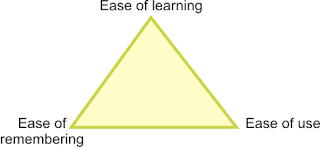 Designers must choose where their software will lie in this triangle, remembering that trying to balance all three could be a dangerous idea.
Mr. Sikking tells us that GIMP aims to have the highest ease of use, and needs not worry as much about ease of remembering. Ease of learning should be of slightly higher concern than ease of remembering. My feeling on the reasoning behind this is that the software tends to be used often enough that the typical user won't have large gaps between sessions in which to forget everything.
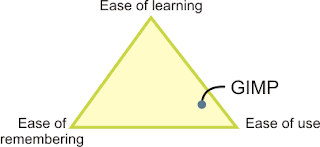 GIMP lies in the bottom right of our Three E's triangle. This can be compared to learning the violin: it is not an easy instrument to learn, but once it has been mastered, beautiful things can be created; however, the musician must keep practicing.
The next part of the presentation detailed the steps taken so far in GIMP's redesign. First, a summary of the software's current functionality was narrowed down to just eleven pages; this took two and a half months to complete. Then, with users observed in their workplace, eight user scenarios were developed, which can be found here. Finally, twenty-five expert evaluation sessions were conducted based on the user scenarios. Notes on this session can be found here. The analysis of the expert evaluation is currently in progress.
The final topic in the talk was a list of the top ten user requests and a brief analysis of each. This portion was mainly delivered by Ms. Giedrojć, and then (unnecessarily) summarized by Mr. Sikking. The key theme here was to use the product vision and user scenarios / expert evaluations to determine which features should be changed or added.
For example, request number nine was for the ability to paint with natural brushes. However, noting that the product vision states that GIMP is not a painting program, there is actually no real requirement for this. Users can write their own plug-ins as desired, but there is no need to consume developer effort on such a request.
As another example, improvements to the text tool was request number eight. Users into original art and web graphics were particularly adamant about this one. Analysis showed that there was no requirement for page layout in particular, and that there should not be one layer per every piece of text. Furthermore, better styling and typographical control is required.
This last example provides the perfect lead-in to my Summer of Code project which will be all about text tool improvements as well. In fact, my first task will be to redesign some of the text UI in Inkscape. The kind of analysis done for GIMP can definitely be applied, though with a smaller scale, to my own work. I'm particularly excited about this because I may finally have the chance to unleash this passion for usability.
It should be obvious by now that I quite enjoyed this talk. It was well organized and reinforced the ideas that I learned in school. I hope to keep an eye on the progress and check out the results, especially because the not-so-usable current version of GIMP never really earned my attention. We'll see if the redesign does any better.
And so it was with great interest that I attended the LGM talk by Peter Sikking and Kamila Giedrojć entitled "OpenUsability - Project overview and first results from the OpenUsability GIMP redesign project."
The GIMP redesign project is a pilot project for an OpenUsability initiative that would have student projects selected and supported in a fashion not unlike Google's Summer of Code. Ms. Giedrojć was the student chosen for this trial run.
Mr. Sikking began the presentation with GIMP's product vision. According to an article by Jim Highsmith found here, "creating a product vision statement helps teams remain focused on the critical aspects of the product, even when details are changing rapidly." Clearly, knowing what GIMP is and is not, the redesign can focus on the features that truly matter.
So, according to the presentation and the project's wiki page, GIMP is:
- Free software
- Intended for photo manipulation
- A high-end application for icons, web pages, and art for user interface elements
- A platform for image processing algorithms
- User configurable such that tasks can be automated with little or no development skill required
- Easily user extendable with one-click installation of plug-ins
- Photoshop
- A painting program (such as Corel Painter)
- A web-page mock up program
- The only Linux based pixel-oriented application on the face of the planet
 Designers must choose where their software will lie in this triangle, remembering that trying to balance all three could be a dangerous idea.
Mr. Sikking tells us that GIMP aims to have the highest ease of use, and needs not worry as much about ease of remembering. Ease of learning should be of slightly higher concern than ease of remembering. My feeling on the reasoning behind this is that the software tends to be used often enough that the typical user won't have large gaps between sessions in which to forget everything.
 GIMP lies in the bottom right of our Three E's triangle. This can be compared to learning the violin: it is not an easy instrument to learn, but once it has been mastered, beautiful things can be created; however, the musician must keep practicing.
The next part of the presentation detailed the steps taken so far in GIMP's redesign. First, a summary of the software's current functionality was narrowed down to just eleven pages; this took two and a half months to complete. Then, with users observed in their workplace, eight user scenarios were developed, which can be found here. Finally, twenty-five expert evaluation sessions were conducted based on the user scenarios. Notes on this session can be found here. The analysis of the expert evaluation is currently in progress.
The final topic in the talk was a list of the top ten user requests and a brief analysis of each. This portion was mainly delivered by Ms. Giedrojć, and then (unnecessarily) summarized by Mr. Sikking. The key theme here was to use the product vision and user scenarios / expert evaluations to determine which features should be changed or added.
For example, request number nine was for the ability to paint with natural brushes. However, noting that the product vision states that GIMP is not a painting program, there is actually no real requirement for this. Users can write their own plug-ins as desired, but there is no need to consume developer effort on such a request.
As another example, improvements to the text tool was request number eight. Users into original art and web graphics were particularly adamant about this one. Analysis showed that there was no requirement for page layout in particular, and that there should not be one layer per every piece of text. Furthermore, better styling and typographical control is required.
This last example provides the perfect lead-in to my Summer of Code project which will be all about text tool improvements as well. In fact, my first task will be to redesign some of the text UI in Inkscape. The kind of analysis done for GIMP can definitely be applied, though with a smaller scale, to my own work. I'm particularly excited about this because I may finally have the chance to unleash this passion for usability.
It should be obvious by now that I quite enjoyed this talk. It was well organized and reinforced the ideas that I learned in school. I hope to keep an eye on the progress and check out the results, especially because the not-so-usable current version of GIMP never really earned my attention. We'll see if the redesign does any better.
LGM: Introduction to SVG
The second talk Andrew and I attended at the Libre Graphics Meeting was entitled "Introduction to SVG" and given by Inkscaper Ted Gould. His aim was to give a general (and not overly technical) overview of what SVG is and what it can do.
Mr. Gould touched on some of the basic elements of SVG (Scalable Vector Graphics) such as gradients, markers, clones, text on a path, inserted bitmaps, alpha transparency, patterns, and so on. Not being particularly familiar with SVG prior to joining Inkscape, and now just learning its capabilities, I was pretty impressed to see via the examples provided all the cool things that SVG has built right into its specification.
 This photo realistic car [found here] was made in Inkscape, and really goes to show what amazing things can be done with SVG.
Mr. Gould touched on some of the basic elements of SVG (Scalable Vector Graphics) such as gradients, markers, clones, text on a path, inserted bitmaps, alpha transparency, patterns, and so on. Not being particularly familiar with SVG prior to joining Inkscape, and now just learning its capabilities, I was pretty impressed to see via the examples provided all the cool things that SVG has built right into its specification.
 This photo realistic car [found here] was made in Inkscape, and really goes to show what amazing things can be done with SVG.
Mr. Gould noted that SVG is XML based, and uses CSS for styles. He gave an example of what a small file that defines a simple square might look like. He also explained the three different profiles used for SVG: tiny (which implements only a small subset of functionality, and is therefore suitable for cell phones), basic (which has a larger subset than tiny, but is still suitable for devices like PDAs), and full (the name speaks for itself). Inkscape is currently aiming for tiny, but once that has been reached, the journey to basic and then full will have begun.
A couple of big bonuses of SVG were mentioned by Mr. Gould. For instance, thanks to the use of XML, SVG files are human readable. This is very good news for Google and accessibility: the search engine can easily parse the contents, and screen readers can "speak" the file. Also, internationalization becomes less of a pain. Graphics with text can be translated just as easily as HTML text, so artwork like logos can be translated easily.
I enjoyed this presentation quite a bit more than the previous talk on the Open Document Format. Maybe it's because Mr. Gould didn't seem to have any kind of hidden agenda, but was still obviously knowledgeable and passionate about the topic at hand. Of course, my personal interest in graphics in general might have something to do with it, too. Either way, I believe that this presentation served all audiences -- the artists, Inkscape developers, and other developers -- rather well.
If you want to learn more about the SVG format, check out the main W3C page for SVG. Don't forget to download Inkscape for all your SVG editing and creation needs!
A couple of big bonuses of SVG were mentioned by Mr. Gould. For instance, thanks to the use of XML, SVG files are human readable. This is very good news for Google and accessibility: the search engine can easily parse the contents, and screen readers can "speak" the file. Also, internationalization becomes less of a pain. Graphics with text can be translated just as easily as HTML text, so artwork like logos can be translated easily.
I enjoyed this presentation quite a bit more than the previous talk on the Open Document Format. Maybe it's because Mr. Gould didn't seem to have any kind of hidden agenda, but was still obviously knowledgeable and passionate about the topic at hand. Of course, my personal interest in graphics in general might have something to do with it, too. Either way, I believe that this presentation served all audiences -- the artists, Inkscape developers, and other developers -- rather well.
If you want to learn more about the SVG format, check out the main W3C page for SVG. Don't forget to download Inkscape for all your SVG editing and creation needs!
Monday, May 14, 2007
LGM: Why Open Standards Matter
The first English talk of the Libre Graphics Meeting was given by Louis Suárez-Potts, Senior Community Manager of OpenOffice.org, and as far as I can see, quite the idealist. The talk was called "Why Open Standards Matter: The Open Document Format" and discussed digital documents in general, the Open Document Format in particular, and freedom as a responsibility.
Mr. Suárez-Potts tells his audience that he is a bit of a historian and treats us to his version of, essentially, the development of documents. Long ago, all formats were available to anyone who had the right education. Special tools were not needed. Unfortunately, it was the politically powerful that controlled the ability to learn the skills required to produce and consume the documents; that is, the powerful more or less owned the information. Fortunately, the formats themselves could be considered transcendental.
Fast forward to today. With modernity comes accessible education, which results in the "exchange and discovery of ideas with the past, present, and future." While politics no longer endangers our information, Mr. Suárez-Potts argues that technology does.
The big bad guys of the day are the Microsofts of the world and their proprietary document formats. "Democracy [and] modernity [are] challenged by a neo-feudalism, and collective memory [is] lost." That is to say that the proprietary digital formats of the day are in the control of the elites who own them.
Indeed, according to Mr. Suárez-Potts, the "triumph of modernity ... comes to nothing if the formats capturing personal and collective memory are proprietary." So when a company (like Microsoft, just for argument's sake) goes out of business, it takes all that knowledge about its closed format with it, locking away the information stored within.
The moral of the story is that while proprietary technology seeks to limit the ability for others to intervene, free information promotes commercial and cultural growth, and open standards impose no limits.
Let's pause for a moment to reflect on what Mr. Suárez-Potts has said so far. He argues that the formats used throughout history have transcended time; it was simply a matter of the average simpleton not having the money, status, or power to learn how to access it. Now that that blocker has essentially been removed, we have been able to go back and recover the information left behind.
I'm not convinced that knowledge stored in proprietary formats will be any different, even if the reasons behind the "closed-ness" are different.
After thousands of years since Egyptian hieroglyphs were regularly used, we have been able to decipher the meaning behind discovered texts. Granted, it took a long time -- explanations and translations had been attempted as early as the fifth century, but success came as late as the nineteenth century -- but determination and careful study prevailed.
Egyptian hieroglyphs once had an "open" standard in the sense that the meaning of various glyphs was well known as the knowledge of how to read and write them was passed down through the generations. It wasn't until the fourth century that few Egyptians could read hieroglyphs and the format became, in a way, closed.
If the knowledge stored in the hieroglyphs was not lost, why should we consider the data in an MS Word file as such? Furthermore, if an "open" standard like hieroglyphs could be lost over time, then who's to say the same thing can't happen to the Open Document Format and other such standards? Finally, what about the possibility that the way documents are digitally stored will give way for something we can't even fathom, not unlike the way that carving in stone gave way to paper and paper gave way to computers?
Back to the presentation.
The Open Document Format, or ODF, is purported to have no secrets, and be completely transparent and accountable. It is about encouraging the reuse of standards. However, it is important to avoid confusion about ODF -- it is not an application, it is just a standard. It needs to be implemented in software like OpenOffice to be useful.
Apparently governments and other areas of the public sector are finally warming up to the idea of open standards. Although many of these formats are implemented in free software, many potential users have seen open source as a source of pain rather than value, and figured the community creating it must be full of communists or some such thing. However, those that do use it may be buying into the notion that "only by focusing on open source can nothing happen." This "nothing" boils down to the loss of important data.
Though not the final point in the presentation, the last part that meant much to me was Mr. Suárez-Potts' assertion that buying proprietary software is like buying into an addiction. He also pointed out that Microsoft's OOXML format has a specification ten times the size of the Open Document Format, so even though it is technically open, it is too hard to implement and could pretty much be considered closed in the end.
I may be missing his point here, but Mr. Suárez-Potts' assertion that buying proprietary software is somehow a terrible evil was pretty insulting. Especially coming from a guy that happily booted up his beloved MacBook with which to give his presentation. Oh, wait -- Mac is "cool," so I guess it's ok to like "cool" proprietary products.
Louis Suárez-Potts is obviously a smart man. He even has a PhD in English. But his message was partially lost on me because of his extreme attitudes. I am convinced there is a place for open standards in the digital world, but I don't buy the notion that information is all but locked away when it is stored in proprietary formats.
Mr. Suárez-Potts tells his audience that he is a bit of a historian and treats us to his version of, essentially, the development of documents. Long ago, all formats were available to anyone who had the right education. Special tools were not needed. Unfortunately, it was the politically powerful that controlled the ability to learn the skills required to produce and consume the documents; that is, the powerful more or less owned the information. Fortunately, the formats themselves could be considered transcendental.
Fast forward to today. With modernity comes accessible education, which results in the "exchange and discovery of ideas with the past, present, and future." While politics no longer endangers our information, Mr. Suárez-Potts argues that technology does.
The big bad guys of the day are the Microsofts of the world and their proprietary document formats. "Democracy [and] modernity [are] challenged by a neo-feudalism, and collective memory [is] lost." That is to say that the proprietary digital formats of the day are in the control of the elites who own them.
Indeed, according to Mr. Suárez-Potts, the "triumph of modernity ... comes to nothing if the formats capturing personal and collective memory are proprietary." So when a company (like Microsoft, just for argument's sake) goes out of business, it takes all that knowledge about its closed format with it, locking away the information stored within.
The moral of the story is that while proprietary technology seeks to limit the ability for others to intervene, free information promotes commercial and cultural growth, and open standards impose no limits.
Let's pause for a moment to reflect on what Mr. Suárez-Potts has said so far. He argues that the formats used throughout history have transcended time; it was simply a matter of the average simpleton not having the money, status, or power to learn how to access it. Now that that blocker has essentially been removed, we have been able to go back and recover the information left behind.
I'm not convinced that knowledge stored in proprietary formats will be any different, even if the reasons behind the "closed-ness" are different.
After thousands of years since Egyptian hieroglyphs were regularly used, we have been able to decipher the meaning behind discovered texts. Granted, it took a long time -- explanations and translations had been attempted as early as the fifth century, but success came as late as the nineteenth century -- but determination and careful study prevailed.
Egyptian hieroglyphs once had an "open" standard in the sense that the meaning of various glyphs was well known as the knowledge of how to read and write them was passed down through the generations. It wasn't until the fourth century that few Egyptians could read hieroglyphs and the format became, in a way, closed.
If the knowledge stored in the hieroglyphs was not lost, why should we consider the data in an MS Word file as such? Furthermore, if an "open" standard like hieroglyphs could be lost over time, then who's to say the same thing can't happen to the Open Document Format and other such standards? Finally, what about the possibility that the way documents are digitally stored will give way for something we can't even fathom, not unlike the way that carving in stone gave way to paper and paper gave way to computers?
Back to the presentation.
The Open Document Format, or ODF, is purported to have no secrets, and be completely transparent and accountable. It is about encouraging the reuse of standards. However, it is important to avoid confusion about ODF -- it is not an application, it is just a standard. It needs to be implemented in software like OpenOffice to be useful.
Apparently governments and other areas of the public sector are finally warming up to the idea of open standards. Although many of these formats are implemented in free software, many potential users have seen open source as a source of pain rather than value, and figured the community creating it must be full of communists or some such thing. However, those that do use it may be buying into the notion that "only by focusing on open source can nothing happen." This "nothing" boils down to the loss of important data.
Though not the final point in the presentation, the last part that meant much to me was Mr. Suárez-Potts' assertion that buying proprietary software is like buying into an addiction. He also pointed out that Microsoft's OOXML format has a specification ten times the size of the Open Document Format, so even though it is technically open, it is too hard to implement and could pretty much be considered closed in the end.
I may be missing his point here, but Mr. Suárez-Potts' assertion that buying proprietary software is somehow a terrible evil was pretty insulting. Especially coming from a guy that happily booted up his beloved MacBook with which to give his presentation. Oh, wait -- Mac is "cool," so I guess it's ok to like "cool" proprietary products.
Louis Suárez-Potts is obviously a smart man. He even has a PhD in English. But his message was partially lost on me because of his extreme attitudes. I am convinced there is a place for open standards in the digital world, but I don't buy the notion that information is all but locked away when it is stored in proprietary formats.
Thursday, May 10, 2007
Libre Graphics Meeting
Soon after joining the Inkscape developer's mailing list, I was introduced to a conference called the Libre Graphics Meeting. In its second year, the event was held in Montreal on May 4th through 6th at École Polytechnique de Montréal. Being from Ottawa, a mere two hour drive away, I felt it was practically mandatory that I make the trip to meet fellow Inkscape developers and learn a bit about the open source world.
Andrew (my fiancė) and I woke up at 5:45 a.m. on Friday morning. Understand that, for software developers, this feels like the middle of the night, so I was proud of Andrew for actually falling out of bed on time. After some breakfast for me and coffee for him, we hit the road. The drive was mostly easy, though the traffic in Montreal at 8:45 a.m. was slightly heavy, making our drive a bit longer than the estimated two hours.
We quickly checked in to Les Studios Hôtel and ran up the hill to the conference building. We made it just in time for the first English talk (many were in French), and one of the most interesting to Andrew: "Why open standards matter: The Open Document Format." I will post about this and other interesting talks later.
For most of the day Friday we listened to more talks, and then we went back to the hotel to bring our stuff up to our room. I should really put quotes around the word hotel because it was really more like a jail that we paid to stay in. The room was tiny (even smaller than expected), and the walls were concrete blocks that were painted white. The bed was probably worse than sleeping on the floor. The things we were supposed to put our heads on were the worst excuses for pillows we've ever seen. Seemed more like folded up tarps with pillow cases.


As you can see, our room was rather depressing.
But enough belly-aching about that. We survived, and it was only $50/night.

Besides, the view from the 15th floor wasn't so bad!
Thanks to the "Grand Souper" being held that night, time in the jail cell was cut short. Some buffet food and a free glass of wine fueled us as we chatted with Inkscape developers and some new friends from other organizations. It was during this time that Andrew and I gained the most insight into the open source world.
The remaining two days of the conference had fewer talks we were interested in, so we took the opportunity to walk around downtown Montreal, ensuring a stop at two of the many local brew pubs.

Andrew enjoys a liter of micro brew from the first brewpub we stopped at.
My reflections on the open source side of things should come through in later entries about the conference's talks, but I can sum the experience up with one thought: Supporters of open source are nothing if they are not passionate.
Andrew (my fiancė) and I woke up at 5:45 a.m. on Friday morning. Understand that, for software developers, this feels like the middle of the night, so I was proud of Andrew for actually falling out of bed on time. After some breakfast for me and coffee for him, we hit the road. The drive was mostly easy, though the traffic in Montreal at 8:45 a.m. was slightly heavy, making our drive a bit longer than the estimated two hours.
We quickly checked in to Les Studios Hôtel and ran up the hill to the conference building. We made it just in time for the first English talk (many were in French), and one of the most interesting to Andrew: "Why open standards matter: The Open Document Format." I will post about this and other interesting talks later.
For most of the day Friday we listened to more talks, and then we went back to the hotel to bring our stuff up to our room. I should really put quotes around the word hotel because it was really more like a jail that we paid to stay in. The room was tiny (even smaller than expected), and the walls were concrete blocks that were painted white. The bed was probably worse than sleeping on the floor. The things we were supposed to put our heads on were the worst excuses for pillows we've ever seen. Seemed more like folded up tarps with pillow cases.


As you can see, our room was rather depressing.
But enough belly-aching about that. We survived, and it was only $50/night.

Besides, the view from the 15th floor wasn't so bad!
Thanks to the "Grand Souper" being held that night, time in the jail cell was cut short. Some buffet food and a free glass of wine fueled us as we chatted with Inkscape developers and some new friends from other organizations. It was during this time that Andrew and I gained the most insight into the open source world.
The remaining two days of the conference had fewer talks we were interested in, so we took the opportunity to walk around downtown Montreal, ensuring a stop at two of the many local brew pubs.

Andrew enjoys a liter of micro brew from the first brewpub we stopped at.
My reflections on the open source side of things should come through in later entries about the conference's talks, but I can sum the experience up with one thought: Supporters of open source are nothing if they are not passionate.
Wednesday, May 9, 2007
Google, Summer of Code, and Open Source Software
My name is Gail, and I'm an open source newbie.
Surprising for somebody who just graduated computer science? Perhaps, but certainly not irreversible.
I'd heard of a few popular open source packages, including OpenOffice.org, and even used Eclipse for many school projects, but I didn't know much more about the world of open source than what the die-hard fans in my class ranted about. Some of the key questions in my mind included how people in open source made money and how the projects are managed, given that most people never meet each other face to face.
Enter Google Summer of Code.
In their FAQ section, Google states that one of the goals of the Summer of Code program is to "inspire young developers to begin participating in open source development." Perfect!
I found the ideal project thanks to one of my school friends (one of the aforementioned die-hards). He knew that I liked graphic design and CorelDRAW, so he suggested that I apply to work on Inkscape, an SVG graphics editor.
My application is online on my portfolio website. I was accepted to work on various improvements to the text tool, which, incidentally, is also what I worked on at Corel during my co-op terms on the DRAW team. I'm really looking forward to getting started and to have the chance to learn more about open source software.
Hopefully throughout the summer project I can post my observations of the open source world through the eyes of a Summer of Code newbie.
Surprising for somebody who just graduated computer science? Perhaps, but certainly not irreversible.
I'd heard of a few popular open source packages, including OpenOffice.org, and even used Eclipse for many school projects, but I didn't know much more about the world of open source than what the die-hard fans in my class ranted about. Some of the key questions in my mind included how people in open source made money and how the projects are managed, given that most people never meet each other face to face.
Enter Google Summer of Code.
In their FAQ section, Google states that one of the goals of the Summer of Code program is to "inspire young developers to begin participating in open source development." Perfect!
I found the ideal project thanks to one of my school friends (one of the aforementioned die-hards). He knew that I liked graphic design and CorelDRAW, so he suggested that I apply to work on Inkscape, an SVG graphics editor.
My application is online on my portfolio website. I was accepted to work on various improvements to the text tool, which, incidentally, is also what I worked on at Corel during my co-op terms on the DRAW team. I'm really looking forward to getting started and to have the chance to learn more about open source software.
Hopefully throughout the summer project I can post my observations of the open source world through the eyes of a Summer of Code newbie.
Subscribe to:
Posts (Atom)