Showing posts with label Visual Computing. Show all posts

Thursday, March 2, 2017

Why I Prefer Processing as a First Language to Teach

Once upon a time, almost 5 years ago, I wrote a post about Python vs Processing as a first language to learn. It became my only post to appear on Hacker News and still gets plenty of hits. The reflections in that post were quite early on in my use of either language for teaching, though. Now that I've used both in several teaching contexts, I'd like to explain why Processing still holds top spot for me when teaching beginners about computer science and programming.

(from a demo in my CS1 course using Processing)

Before I begin, I'd like to say that just because I like Processing best doesn't mean that other options aren't also good. Python, for example, is still a good first language in my view; I even use it in some of my course designs and workshops, especially if someone is in a field that will likely only ever use Python. For younger audiences, Scratch is still my go-to. There are many other languages and tools I probably haven't even seen yet that have great promise, too. But for workshops and courses to introduce beginners in high school, post-secondary, and beyond, Processing remains my go-to.

Without further ado, here are some of the reasons why I love Processing...

Processing is easy to download, install, and run. When you open it, it looks clean and simple. You can ask learners to write in one line of code, press play, and see a drawing pop up. This matters, especially when you are aiming to reduce intimidation of learning to program among less traditional groups. I'm always looking to remove any barrier possible that might make a beginner "nope out" of computing.


The fact that Processing's main purpose is to create visual output is also a huge bonus. You need very little code to create something that is meaningful enough to show others. Running home to show your family that your code spits out a number on a console just isn't the same as showing a (usually interactive) visual program. On the console, it's harder to understand that the code does something interesting and that it took effort to do it.

A further advantage of visual output is the ability for learners to see more of what their own code is doing. When you perform a computation with a single result at the end, the code can feel a bit like a black box. If the answer is wrong, which part of the code caused the issue? At least when all your code contributes to what's on screen, you have some more ability to reason about which code is causing the output to be wrong.

Pedagogically, I have a strong preference for introducing as few individual concepts at a time. I don't like the approach of most textbooks and courses I see, where all the fundamentals (variables, branching, iteration, functions, etc) are introduced quickly up front with toy examples before finally getting to the more interesting projects/demos. At the same time, starting with something too complex right away is intimidating and would likely lead to cognitive overload (*cough* Pygame).

I find that Processing allows me to design demos of just the right complexity. Each new demo only needs max a few new concepts (be it a programming concept or something Processing-specific like adding images). I can show the demo, and start working on creating it, introducing concepts just-in-time. It's also possible to design lots of interesting exercises with the same minimal number of new concepts, allowing learners to focus on mastering a small number of things at a time. I find this more difficult to achieve with other languages, even if there is a visual component (for example, I found Python Turtle too restrictive to achieve this for anything longer than a short workshop, while Pygame is way too complicated up front).

As an example, here is a summary of my CS1 course design in terms of the demos I cover for each module and the concepts that are introduced (more detail, including slides and code):

  • Drawing pictures with Processing – a static image with several semi-complex entities (basic drawing, variables)
  • Interactive painting with Processing – an interactive painting program that allows you to change colours (active mode/interactions, basic functions, switch statement)
  • Jukebox – a music player with three buttons to start and stop songs (functions as abstractions, Boolean expressions, if statements)
  • Sheep AI – pet sheep that wanders toward your mouse, drinks tea when it reaches it, and emanates coloured rings when clicked; pictured above (state machines, while loops, arrays)
  • Foreign student data visualization – visualization of sortable data available on Canada's Open Government website (Strings, algorithms, state-only objects, constructors)
  • Social media set cover problem – contextualized example and visualization of the set cover problem for a small set of data (shared data and references, for loops)
For beginners I prefer teaching languages that are statically typed and generally more 'rigid' for lack of a better term. The more the compiler or interpreter can tell you about what you're doing wrong, the better. I've seen so much frustration from my students working in Python because they do weird things that are syntactically correct, but make no sense semantically. Of course this point doesn't limit the choice to Processing, but it's an added plus for me.

It can also be useful that Processing is Java, but with the tricky parts abstracted away in the IDE. Starting this way is great because you don't have to say things like "don't worry about what public static void means, I promise it'll make sense later." Yet students are actually learning Java syntax when they learn Processing, and can even start pulling in more advanced features of Java later on if desired. When a follow-up course is done in Java (as the CS2 course I designed is required to be), the transition is smooth. Even better, you can still use the Processing library in a 'regular' Java project (example), so you can incorporate it into those later courses if you want. For instance, in CS2, I do so to get students using a third-party library and to learn about MVC and event-driven programming (see more).

I could probably go on about how useful I've found Processing in teaching beginners, but I think this is a pretty good list for now. I'd love to hear about how you've used Processing in your own teaching!

Tuesday, June 9, 2015

A Classroom Game to Teach Data Representation With Images

Our Gram's House team has been working on three classroom games designed to teach middle school girls about computer science principles.  One game intends to teach data representation by showing how images can be represented on computers with numbers.  Here are the current rules of the game.  These are not final—there are open questions about some individual rules, and we need to do more play testing with the target audience.  Feedback is most definitely welcome!

Materials

Each player will receive two pieces of paper.  The first will be hidden from the other player and contain an encoded image and the total number of black cells contained in the image.  The image will be different for both players.


The second page is a blank grid where the encoded image will be revealed over time.  This page will be placed on the table where everyone can see it.  Each player must copy the total number of blacks in her image onto this page.


Each player also needs a pen.

Rules

Players alternate turns, with the youngest going first.

On her turn, Player A calls out a row number and column number.  Player B then takes one of the following actions:
  • If the cell on Player B's publicly revealed image is blank, the colour of the cell will be revealed.
    • If the corresponding cell on Player B's hidden image is a 0, Player B places a dot inside the cell on the revealed image to indicate that the cell is white.
    • If the corresponding cell on Player B's hidden image is a 1, Player B colours the entire cell with her pen to indicate that the cell is black.
      • When the revealed cell is black, Player A gets to call a second row and column, which can be for the same cell or a new one.  This happens only once, and only when revealing a black cell for the first time.
  • If the cell on Player B's publicly revealed image is already revealed as a certain colour, a run of cells directly to its right is also revealed until the colour changes, or the row ends.
    • If the very next cell is a different colour, nothing new is revealed.
Winning the Game

A player wins the game if the public image of their opponent has all of its black pixels revealed first.

Example

Here is an example turn.  Player A is trying to reveal Player B's image.  Player B's publicly revealed and hidden encoded images currently look like this:


Player A calls "4, 2" which means she wants to reveal the cell at row 4, column 2.  Player B looks at her hidden encoded image and sees that the cell at "4, 2" contains a 1, so the cell needs to be coloured black:

Because a black cell was revealed, Player A gets to call an extra row and column.  Though not required, she decides to call "4, 2" again to see if she can reveal a run of blacks following the first one.  Player B sees that there are three more cells that contain 1 before the colour changes, so Player B colours in all three cells:


Player A's turn is now finished.

Friday, April 12, 2013

When is Augmented Reality the Right Choice?

Last fall, we published a paper about augmented reality, cognitive theories, and learning. I previously wrote about the design advantages of AR; these give insight into when AR is really the best choice for an interface.  The following is from our paper.  If you find it useful, be sure to check out the complete work on my website.

[Augmented reality's design] advantages can be used to decide whether augmented reality is a good interface for a particular type of learning scenario. The applications that most benefit from AR are generally those that make natural use of all four categories of advantages.

Virtual flexibility is inherently desirable in all digital tools and applications we design. Similarly, it is desirable to incorporate aspects of the invisible interface. We do not want our users to unnecessarily switch their attention between multiple artifacts, for example. We also often try to incorporate natural movements, direct manipulation, and gestures in our interfaces.

In contrast, not all applications need to make use of spatial awareness or even have an environment to align virtual objects in. For AR to be a good choice there must be a clear and meaningful relationship between virtual objects and the real world. This might mean that a virtual object is attached to an explicitly related object or location. For example, a digital label that describes the object must be spatially aligned to it to make sense. Or, the relationship may come from seamlessly integrating the virtual object into the environment. For instance, a virtual animal might be shown as though it were present in its real habitat, giving learners the opportunity to observe it. The cognitive theories above offer some suggestions as to where such relationships may be useful, such as when building new mental models or providing situated meaning to the virtual data. But if there is no good reason to associate the virtual objects with some aspect of reality, then AR is likely not best for the application.

Whether an application needs reality for free is also an important consideration. It is advantageous to make use of the real world when details found in reality are key to the application. Including reality as it is rather than building a virtual representation of it saves programming effort and reduces the risk that important details about content or behavior are left out. This can be critical when the application involves a task requiring specific behavior with real-world objects. When training for or performing surgery, for example, the exact dynamics, texture, and color of human tissue would be difficult to simulate, yet may be important to the surgeon.

Because virtual flexibility and the invisible interface represent goals we have for all applications, spatial awareness and reality for free offer the best insight into when to choose augmented reality over other options. If an application can't clearly take advantage of these, then there is likely a more suitable interface type, as is the case with abstract domains in which users do not interact with tangible, real-world objects or data. Instead, users work with virtual information (like data on a computer) or physical abstractions of reality (such as charts). When reality does not play a prominent role in the application, it is difficult to make a meaningful connection between virtual and real objects. For instance, some examples of AR artificially create a connection to reality by having users hold a specially designed card upon which a 3D model will be displayed. While the method of interaction allows an enactive approach to viewing the model, the same could be accomplished with fully digital interfaces that support natural gestures. It is not clear that augmented reality is well used for this kind of application.

On the other hand, applications designed to support learning tasks that are already centered on the real world can make good use of both reality for free and spatial awareness. Information or problem solving aids can be tied to the relevant aspects of the real environment, as for learning about car engine repair: virtual labels can identify components of the engine while visual instructions can guide the learner. It would not be as easy to do this task virtually given the physical changes made in the real world. The virtual objects have a clear connection to the engine parts in the real world. Many learning applications also benefit from these advantages when, for instance, real world context is important. For example, an application designed to teach photography could use augmentations to illustrate important concepts of composition, depth of field, and so on with visualizations overlaid on the actual scene being photographed. Though these concepts can be illustrated with photographs already taken, interacting with them in real time in the real world makes their context much clearer and helps build a much better mental model. For both these applications, AR is a strong choice.

Paper content copyright by AACE. Reprinted from the Proceedings of World Conference on E-Learning in Corporate, Government, Healthcare, and Higher Education 2012 with permission of AACE (http://www.aace.org).

Tuesday, April 9, 2013

Design Advantages of Augmented Reality

Last fall, we published a paper about augmented reality, cognitive theories, and learning.  One of the tasks of the work was to specifically define what the design advantages of augmented reality are.  I'd like to share our list here, which is directly from our paper.  If you find it useful in thinking about why one should use AR, check out the paper on my website.

Reality for Free

AR mixes real and virtual objects. As opposed to purely virtual experiences, augmented experiences can be richer and more elaborate because of the deliberate inclusion of real-world objects and behaviors. We can separate this advantage into three distinct elements:
  • Content. Because the real world is used directly, the AR environment is vast and detailed. A purely virtual experience suffers from a confining bottleneck of content creation.
     
  • Behavior. Rich real-world behaviors, such as the laws of physics, are included without effort. In a purely virtual environment, these would need to be simulated by code.
     
  • Multiple Senses. Interfaces to purely virtual worlds are typically limited to vision and sound, perhaps with modest haptic feedback; the real world provides a wide array of sensory experiences, including taste, smell, and ambiance such as temperature and humidity.
Virtual Flexibility

The counterpart to the advantages accruing from the use of reality is the flexibility afforded by the use of digital artifacts. Their appearance and behavior are governed by code, and hence can be altered according to the needs of the user or application. The following are two of the most prominent applications of this flexibility:
  • Customization. Virtual artifacts can be personalized according to user preferences; for example, attributes such as language or color can be adjusted.
     
  • Impossibility. Virtual content can depict objects and processes that are impractical or impossible to bring to users otherwise, for instance because they don't exist in the real world, would take too long to observe in real time, or would be dangerous to experience directly.
Invisible Interface

AR users retain their ability to move freely and the interface does not interfere with their ability to observe their real-world environment. They are able to switch attention seamlessly between real and virtual objects; in some cases (such as descriptive markup) the user may not care whether an object is real or virtual. We want to particularly emphasize two aspects of the invisible interface:
  • Natural movement. User input can take the form of familiar real-world actions; direct manipulation and gesture based interaction are possible.
     
  • Single focus. When augmentations are aligned with the task at hand, focus can stay in one place. Users do not, for example, have to change their focus from their task to a paper manual opened beside them.
Spatial Awareness

Some of AR's advantages owe their existence to a clear connection between real and virtual objects, including larger-scale entities such as physical locations. We distinguish two advantages relating to the physical context in which augmentations are embedded:
  • Adjust to surroundings. Virtual content automatically updates as the user's surroundings change; change can either be a change in the world (such as the movement of a real-world object or a change in temperature) or reflect a change in the user's position or viewpoint.
     
  • Align spatially. Close matching of real objects with virtual markup makes associations obvious. For virtual objects which may not have a real analog, opportunistic matching to real objects can lend physicality. For example, labels aligned to a particular object are clearly meant to give information about that object as a real label would.
Paper content copyright by AACE. Reprinted from the Proceedings of World Conference on E-Learning in Corporate, Government, Healthcare, and Higher Education 2012 with permission of AACE (http://www.aace.org).

Thursday, February 14, 2013

Kid Friendly Newspapers Via Augmented Reality

Someone recently shared this Popular Science article about an augmented reality app that 'translates' newspapers for children.  The main idea is to simplify the language, add animations, and include character commentaries to make difficult topics easier and more enjoyable to read.


At first, this seems like a really cool use of augmented reality.  Maybe it could even help revitalize the newspaper industry.  Why not transform something that's designed for adults into something adults and kids can enjoy together?

The only problem is that the newspaper isn't really needed once you have the app.

I mean, it's needed in a literal sense, since that's what kicks off the augmentations in the app.  But once you have a digital version of the contents, why would you need a print version, too? Is the 'reality' part of this augmented reality app adding something - anything - to the experience?

To understand why AR apps should meaningfully include reality, have a look at my recent work on the subject.  If reality isn't an integral part of the AR equation, then we probably aren't using the best interface for the job.  This goes for learning apps, which I focused on in the above link, as well as many other types.

The article above seems to agree with this sentiment, asking these questions among others: "If you already have the content, why not just post it online, Tokyo Shimbun? Will any kids actually want to use this?"

Very good questions indeed.  I truly believe AR has huge potential, especially in education.  But it's never going to move past gimmick if we can't design apps that align with reality for a reason.

Friday, October 12, 2012

My Brief Visit to E-Learn

I went to Montreal on Wednesday to present my work on what makes augmented reality good for learning (and in general, really).  The conference was the World Conference on E-Learning in Corporate, Government, Healthcare & Higher Education (or just E-Learn for short).  It was an interesting experience, but in the end, not entirely satisfying for me personally.


I only attended E-Learn for the day since it would have been difficult to bring the baby along this time, and Montreal is only 2.5 hours away on the train.  This meant that I missed all the keynotes and, because I also had to pump milk twice while there, many of the regular sessions.  Some of the sessions I did see were so poorly presented that I don't even know what they were about anymore.

I felt like I did a good job of my talk. (The slides are above, but they are fairly minimal and are missing the transitions.  If you're interested in this work, definitely check out its research page, where you can read the full paper.)  Unfortunately, it seemed that the audience wasn't quite right.  My work is more geared toward those building augmented reality systems, while the people who attended my talk seemed to be those who want to use AR.  So here I was convincing them how great AR could be for them, but had little to offer in easy, ready-for-the-classroom solutions.  I felt kind of down about it by the end.

Luckily, a few people came and talked to me later in the day, and that boosted my spirits.  Some just commented that they enjoyed the talk, and others were itching to collaborate.  For instance, the chair of the session told me he requested it because he thought my topic was interesting.  He mentioned he wanted to do something with QR codes.  Since the little QR code app I've been working on here and there is almost app-store ready, I figured we may as well try it out for his needs.  At the same time, we could try to employ the advice in the paper to help validate it experimentally.  I'm looking forward to getting in touch with him soon.  There was also a lady from Carleton that might be able to make use of my work, and we'll meet up for coffee sometime soon.

The most interesting talk I caught after my own was by one of the founders of an ed-tech company from Toronto called Spongelab.  They do educational games, but that wasn't what the talk was about.  Instead, the focus was a recently released science education content community, which is what you see when you visit the main website.  It's a place for sharing and organizing resources to use in STEM education, and is free and open for everyone to use.  It looks quite promising, though there is currently nothing for computer science and only a bit for engineering (perhaps something we can work to fix?).  If you're an educator in STEM, I recommend checking it out.

Maybe it's because I was there for such a short time, but I didn't get a lot out of attending E-Learn.  I can see why others would like it, but I doubt I'd want to go again unless I had a paper that was really well suited to their program. But that's ok - I am glad to have my AR work out there, and will look forward to the potential collaborations that come out of it!

Friday, September 28, 2012

My Processing Workshop Materials

Last weekend I taught a one-day workshop called 'Create Interactive Art and More! Learn to Program with Processing.'  I developed the materials from scratch for the workshop and hope to use them again.  Overall the day went quite well, but as always, there are things to improve.


In the morning, I did a round of intros from the group.  This was for two reasons: first, to allow those who were late to make their way in (the weather wasn't great and even I had a hard time finding the door to get in), and second to build a sense of community.  Although this took a little longer than I would have liked, it seems that both goals were met.  I had some students say how great it was to see how many other non-programmers and artists were there.

The morning largely involved me talking about a programming concept using some analogy, and then getting the students to type in some example code.  I had them play around with the specifics of the code to learn about how Processing worked experimentally rather than just hearing me describe the syntax.

 
This worked fairly well, though there were times I would have liked to move on a bit quicker.  One challenge was getting everyone's attention while they were playing with code.  Sometimes the TA's would continue helping someone even when I wanted to tell the class something; next time, I should be sure to ask the TA's to pause for a bit when I need to move on.  The analogies themselves seemed to work well.

In the afternoon, I had some programming concepts to finish covering.  Next time, I should schedule more than two hours for this portion of the workshop.

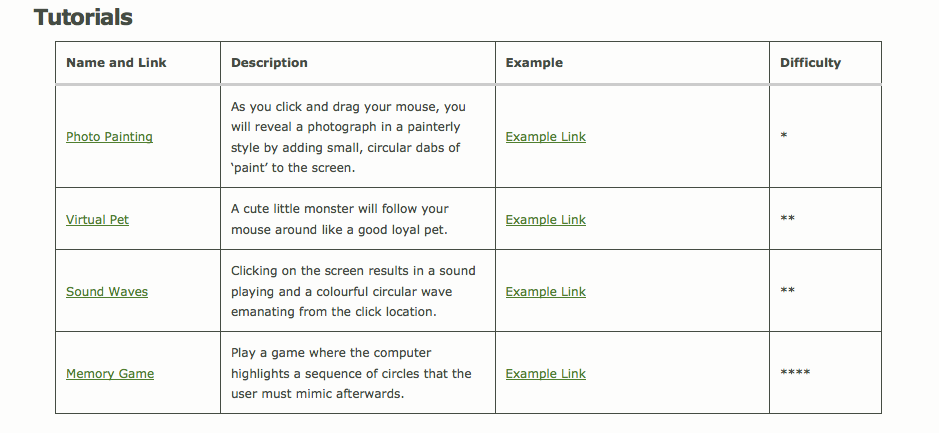
After the formal part, I got the students to look at four tutorials I had written up.  To make the tutorials, I had first programmed four little projects in Processing, then tried to put myself in a beginner's shoes to describe the steps to writing the code.

I tried to keep the tutorials fairly simple, though my last tutorial for a memory game ended up being much more complex.  I decided to finish the tutorial for that one anyway just in case there were some folks who had programmed before (and there were).


My goal in writing the tutorials was to entice the students to ask questions during the class.  I wanted to use a 'just-in-time' teaching technique where things would come up as questions the TA's could help with while they worked through the tutorials.  So there were definitely things in the tutorials that weren't discussed much or at all in the formal portion of the workshop.

However, it seems that my tutorials weren't quite clear enough.  Students had a bit of trouble knowing exactly what to do if they hadn't programmed before.  So, since the workshop has ended, I have modified all but the memory game tutorials, adding specific, highlighted instructions on what to do.

My course notes and tutorials are all available online so the students can try them after the workshop as well.  If you'd like to give Processing a try, or just see whether I've done a good job with the tutorials, I'd love to have you look at them and post feedback as a comment here on the blog.


I'm hoping to collect some more data on how well the workshop went through a survey I sent out to the participants.  It has been challenging to get many responses, but hopefully they'll continue to come in.  I am already considering running the same workshop (with improvements) next semester, perhaps targeted toward students, so hopefully I can get some more data then as well.

Thursday, September 20, 2012

To Be Published: Understanding the Power of Augmented Reality for Learning

I'm pleased to say that my work on cognitive theories and augmented reality is finally going to be published. 'Understanding the Power of Augmented Reality for Learning' was accepted as a full research paper for the 2012 World Conference on E-Learning in Corporate, Government, Healthcare, and Higher Education, happening this October in Montreal. 


This paper has gone through several iterations, each one better than the last.  The version being published here has a learning slant, and although this wasn't the focus when we started, I'm happy it ended up here given my passion for education.

But that's not to say that the ideas are not applicable to other domains.  In fact, I'm hoping that some of you will take the next step.  I'd really love to see future work build on this, applying the advice we put forward to future projects and digging deeper into these cognitive theories and others.  If you're interested in moving the research forward, feel free to contact me and I'll share some more ideas (I won't be doing this line of research for my thesis anymore).

Without further ado, here is the abstract and a link to the preprint version of the paper.
Abstract: Augmented reality has recently become a popular interface for various learning applications, but it is not always clear that AR is the right choice. We provide a theoretical grounding that explains the underlying value of AR for learning and identify when it is a suitable interface. Our list of operational design advantages includes AR's use of reality, virtual flexibility, invisible interface, and spatial awareness. This list is backed by four underlying cognitive theories: mental models and distributed, situated, and embodied cognition. We argue that the more design advantages a learning system incorporates, the better AR works as an interface. We also identify a set of questions to be used in the design and evaluation of AR projects. With this, we can begin to design AR for learning more purposefully.

Monday, October 24, 2011

Computer Science is Everywhere! (Even Photography)

Last week I did a couple of workshops at the Canadian Museum of Science and Technology for National Science and Technology Week.  I managed to improve the usual 'computer science connects to everything' theme to be more interactive, and judging by the apparent engagement of the students, it was a success.  Below is an outline of what I presented - feel free to adapt it for your own presentation (with some credit to me if you don't mind).
I'm here from Carleton University to tell you about one of the biggest reasons that I love computer science: it connects to everything! No matter what your interests are, or your passions, there is a problem waiting to be solved and a way to make life easier or better with computing.  Even something as creative as photography has a lot to do with computer science, as we'll see later.
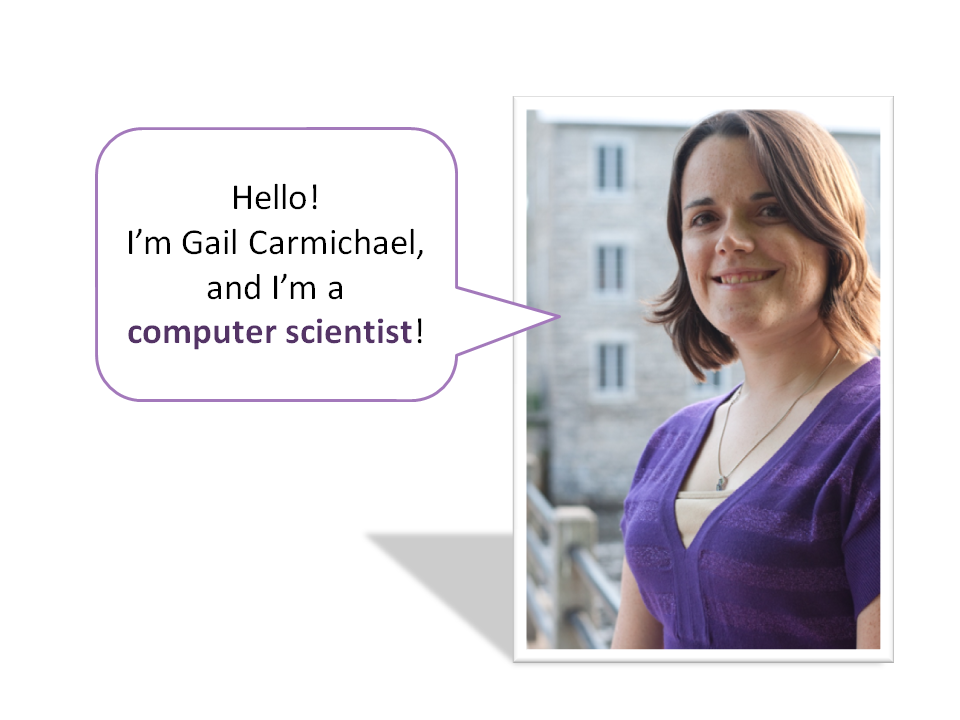
My name is Gail Carmichael, and I'm a computer scientist. Of course, that's not all I am.  I'm also a PhD student (which means I've been in school for almost ten years since high school!). I do Taekwondo (anyone else into martial arts?) and like to go backpack hiking and work on my garden.  And, as you can see, I'm also going to be a mom soon!

(I always make an effort to show the students that just because you are into computers doesn't mean you can't also be into lots of other fun things as well.  This time I was also able to talk about becoming a mom, which I think it really important for both the males and females to see.  In fact, one of the boys came up to me after the workshop to wish me luck with the baby - how awesome is that??)

I'm also part of a group at Carleton called Women in Science and Engineering.  In fact, I helped start this group a few years ago.  I don't know if you all know, but we still have far too few women in computer science, and we want to fix that.  So, ladies in the audience, I encourage you to look into computer science as a possible career if you see anything today that interests you! (Guys, too - we want all the smart people!)

Ok, so let's talk about computer science.  Anyone have any ideas of what computer science might be? Or maybe what kinds of things computer scientists do?

(You usually get answers more related to using computers, but you can also often get some good insight into what the field's really about.)

I'll tell you exactly was computer science is about in one second.  But first, I want you to all take a minute to brainstorm as long a list as you can of areas of your life where computing is involved.  Think of the obvious, like cell phones, to the less obvious, like toasters (yup, even your toaster might have a little computer inside!).


Here are some of the areas I thought of.  Some of these are more obvious, like the iPhone and video games.  What about some of the others?

(I find the students love giving more ideas on these topics or asking questions about them.  Invite interaction here as much as possible.)
  • Music: You could write software that analyzes music and automatically creates a playing list that would suit our current mood.  Or you can try to teach the computer how to create good music from scratch.
  • Medicine: You can use computers to simulate chemical reactions and help us narrow down what sorts of things might be effective in treating particular illnesses.  You can also use computers to crunch the huge amounts of data in our DNA, helping us find genetic issues in a person.  (Bet you didn't think you'd be able to save lives as a computer scientist, did you?)
  • Video Games: Sometimes we want to provide good entertainment as computer scientists, and making games is one way to do this.  You can even study game development as a whole concentration in our computer science program at Carleton!
  • Geography: When's the last time you used Google Maps or a GPS device? There's a lot of computer science happening there, such as when you are finding the most efficient route to your destination.
  • Psychology: If you're interested in the way people think, you can help design technology that makes sense to humans.
  • Math: Computer science can be a very mathematical way of thinking.  (But don't worry, you don't have to be a math whiz to do well in this field!)
  • Robotics: We have to program robots to get around without running into things and much more.
  • Education: I want to make games that are both fun and educational.  School looks very similar to what our great-great-grandparents experienced, but I think that technology can help change that and make learning more fun and effective!

In the end, computer science is really all about solving problems.  It's not about programming or software or any of that stuff on its own - these are all just means to the end of making the world better.

(Try to relate the students' answers from earlier into the above discussion.)

What problems are there to solve in photography? How can we improve such a creative practice with technology?
Some of you might remember taking photos with film before digital cameras became standard. Film worked by having an actual chemical reaction to the light that hits it.  How do we take a picture digitally?

(If there's time, it's fun to get them guessing how we get from a scene in the world to an image on the computer.)

Instead of using chemicals that react to light, we can create what's called a digital sensor that can sense what light is hitting it.  But how does this translate into what the computer can understand?

Do you know how data on your computer is stored? What everything ends up being in the end? (Answer: numbers! Binary numbers in particular.) Even an image is going to end up as numbers.  So we need to translate the light hitting the sensor into numbers somehow.
Let's say I took this photo with my digital camera and I'm looking at it on the computer.  What happens if I zoom in really close? (Answer: it gets pixelated, blocky, blurry, etc.)

Our digital sensors are made of grids of pixels as well, and each of these pixels captures the amount of light that hits it.  Then we can store this as a number for each pixel on the computer, representing the image.


(At this point, I use images from the CS Unplugged Image Representation activity to demonstrate how this can work with black and white images, and I give them some time to try recreating the pictures on the handout on pg 4 of the PDF.  We discuss the pros and cons of the two ways of representing the image - each pixel as its own number or writing out the number of black or white pixels that come in a row - and I emphasize that we often have to consider tradeoffs when solving problems in computer science.)

To conclude, let me say again that computer science is everywhere.  In photography, there are many more problems that computer science helps solve, from organizing and searching through our photos to applying interesting effects to them.  Computing touches every part of our lives, from keeping us healthy to keeping us entertained.

Monday, August 15, 2011

Impressions of SIGGRAPH 2011

Last week I was in Vancouver for this year's SIGGRAPH conference - not presenting, but as a lab trip.  As the website says, the "conference and exhibition is a five-day interdisciplinary educational experience including a three-day commercial exhibition that attracts hundreds of exhibitors from around the world. SIGGRAPH is widely recognized as the most prestigious forum for the publication of computer graphics research."  These are some of general impressions of my first SIGGRAPH experience.

 Fellow lab member Jamie and I outside the convention center.

Location. Being able to stay in Canada was nice for us (especially since we could use our cell phones and data plans).  Getting from the airport to downtown was a matter of taking one train for just half an hour - very convenient!

The convention center was split into two buildings - east and west - but it was no
problem getting between them for what I wanted to do.

Venue. I thought the convention center was amazing.  The rooms were well equipped, the decor was appropriate, there were plenty of washrooms and water fountains, and the views of the water were wonderful.

Exhibition.  I wasn't a huge fan of the exhibition as I personally found it overwhelming and overly commercial; however, for those that like seeing all the newest products and services, and don't mind the scale, it was probably quite good.  It was obvious that much money was spent on the booths there.

SCVNGR. The Google booth at the exhibition advertised  a SCVNGR opportunity to get some Google swag.  I figured it might include actually looking more carefully at some of the other booths there, but that definitely wasn't the case.  In the end I found it to be unclear (I could only win one prize even though there were two rewards listed in the app for SIGGRAPH), and mostly disconnected from the actual location (some of the challenges were just math puzzles).  It didn't enhance my experience at all.

Animation Festival.  One day when I was too tired to take in any more talks, I spent the afternoon watching animated shorts.  I enjoyed this way more than I anticipated! The quality was spectacular and there was much variety in the animation styles and the stories.

Courses.  I took in a couple of courses throughout the week.  I was a little surprised by how little they resembled actual courses.  Instead, they were pretty much a series of lectures on a particular topic.  Huge audiences, no interaction, and not much practicality (though this may have just been what the ones I attended were like).  I still learned a few things, but feel like I could have learned a lot more if the format was closer to a workshop.

Technical paper presentations.  I actually didn't end up seeing a huge number of paper talks since I figured I could read papers later more easily.  The presentations I did see were like most that occur at conferences: not very good.  The expected standard of talks involve text on PowerPoint slides and presenters who forget that oral communication is a very different thing from written communication.  There was one great presentation that I saw, but I will save writing about that for when I do another post about the game papers.

Emerging Technologies.  This was one of my favorite parts of the conference.  There were so many interesting or just plain fun exhibits.  I particularly enjoyed the pregnancy simulator vest that gave the wearer an idea of what a kicking baby and a growing belly and breasts would feel like.  Being that I'm almost five months pregnant myself, I wish my husband could have tried this out. ;)

While the pregnancy simulator suit grows, you see information on the screen that
explains baby's current status each week of the pregnancy.

Art Gallery. This was with the Emerging Technologies.  Some of it was pretty neat, but some of it I didn't really "get."  Art can be like that.  I was most taken by the remote wind exhibit.  The idea was interesting and the result was relaxing to watch.

These wispy grass-like metal structures moved according to how the wind blows in some remote location.

Overall, I liked SIGGRAPH.  I was regretting going at first because we had to leave for our big east coast vacation only 30 hours after I got home from Vancouver, but I'm glad I got to experience it.  Whether I end up back again to present one day or not, it was well worth experiencing this conference at least once.

Tuesday, January 25, 2011

QR Code Story Adventures

A QR code is 2D bar code that was standardized well enough that free decoders are readily available for computers and smart phones.  You can encode about 3 KB of data according to Wikipedia, and this data can simply be text.  The most common use seems to be to encode web site addresses that will be loaded in a browser automatically after the QR code is decoded.  Because it's so easy to generate your own codes, just about anyone can set up their own scavenger hunt by hiding a bunch of custom codes locally and simply requiring players to write down what the codes say.

giaLLLo QR CODE ?G!question
giaLLLo QR CODE ?G!question by giaLLLO!

By adding just a little more structure to this concept, you could orchestrate stories that enforce finding QR codes in a particular order.  The Hyperlab at Carleton has done a lot of research on writing narratives appropriate for this kind of scenario.  A GPS-based system called Whereigo facilitates the creation of stories and games that are tied to location.  Combining these two ideas would allow for finer grained placement of interesting story pieces than is possible with GPS alone.

I'm currently working on an iPhone app prototype for QR-based stories.  If it goes well, I am thinking about creating an authoring tool to make it easy for everyday users to create their stories, then polishing and marketing the app.

Tuesday, January 11, 2011

Taking Advantage of Emotion with Augmented Reality

I've been thinking about how augmented reality can take advantage of emotion to help people complete their tasks more efficiently. These musings were originally for a potential paper, but since this particular paper concept is going to be shelved for a while, I thought I'd share some ideas for applications I had.


Aster d'automne...!!! by Denis Collette...!!!

Many augmented reality researchers choose to define AR rather strictly, focusing on visual digital content registered to the real world in 3D.  This content could be shown with a heads-up display, a web cam as a magic mirror, or through a portable device as a magic lens.  Content can also be projected onto surfaces.

But by expanding our idea of what augmented reality is, we can be looser in thinking about the kinds of devices and technology that could be created to augment a user's perception of the world around her.  Some definitions of AR simply require that content aligns to the world in some meaningful way, but unlike the strong tie that visual augmentations often strive for, this could be as simple as location-based sounds and information.  Thinking this way takes away the distraction of not having good enough technology for the types of augmentations envisioned.

Emotion can be a “key source of motivation for driving thinking, learning, and problem solving” (Gee, Learning and Games, Ecology of Games). As Norman says in Emotional Design, “[w]hen you are in a state of positive affect, … neurotransmitters broaden the brain processing, the muscles can relax, and the brain attends to the opportunities provided by positive affect. … Positive affect arouses curiosity, engages creativity, and makes the brain into an effective learning organism.” The fact that AR allows us to provide content or information in the real world alongside real situations and tasks means we might be able to affect user’s emotions - and thus their activities - in their daily lives in a new way.

For example, consider someone learning to run. From experience, I can say that this can be a very unpleasant task (yet many of us still try because the rewards are great). What if we used AR to create an emotional sound scape that both distracts from the painful shin splints you might be developing, and takes you to various locations with a particular pace, effectively guiding you to run properly without even realizing it? Could a story be told that causes changes in the way you run, slowing you down as you look for the location of the next part, or run faster as the story intensifies?

Another type of system might use affect to keep your attention on a particular task (unlike the running example, which aimed to take your attention away from it). Warning lights in cars today might be loosely considered a form of augmented reality since they react automatically to the context of the car they are situated in. Could (or should) affect be used to build more effective warning mechanisms? How might we consider additional context beyond the car, such as weather conditions or other vehicles, and use affect to guide the driver’s attention or support his ability to problem solve very quickly in potentially dangerous situations? Could it help our driving calmness if pleasant imagery (or even sounds, for that matter) surrounded us in regular driving conditions? Could a visceral reaction to traditionally dangerous colours (possibly sharply pointing in the direction of trouble) alert us to danger sooner if there was a sudden change in the car’s surroundings?

A last example might take advantage of Norman’s reflective level of emotional design. Many have considered tourism systems that give historical or cultural information about one’s surroundings. Suppose we designed a system that took into account theory from affect to help users capture their memories in such a way that when they return to particular locations they are able to recall them vividly and fondly. In a sense, users would create a memory-scape set in real locations with sounds, images, and videos (or perhaps even haptic feedback, given the right device) that they can revisit anytime. The real trick is to not concentrate on the technology itself (which often happens in augmented reality research), but on the emotions, and how to help users capture their memories effectively.

There are several existing examples of augmented reality systems that read and react to a user's emotional state, so I've been concentrating here on systems that affect the user's emotions instead.  Have you seen any great examples of this? Could you see emotion being useful or enjoyable when used with augmented reality?

Monday, November 8, 2010

Kinect

It took me a whole two days after launch to finally get it, but I now not only have a Kinect but my first Xbox console.  After playing an evening with my husband, my brother and his friends, then again last night, I have to rate it very highly.

We played Kinect Adventures, which came bundled with the console and Kinect sensor.  It was really easy to get started with the obvious controls, and thanks to the competitive nature of our guests, we had fun playing the same level many, many times.  Our only issue was that we had barely enough space.  The taller folks of the group definitely hit their head a few times on the heavy metal chandelier.  (The image below gives you a pretty good idea of what looked like, except that we only had room for one player at a time.)

E3 2010 Xbox 360 Kinect demo booth
Credit: E3 2010 Xbox 360 Kinect demo booth / popculturegeek.com

I got Kinect largely because I see potential for some augmented reality games that I could work on for my thesis.  There's clearly a camera in there based on the photos Kinect took of us while we played Kinect Adventures, but how good it is remains to be seen.  I'm guessing the photos taken in this game are purposely low-res so they don't clog up the storage space.  Some demos show people video chatting and such, and the picture looked a lot better for those images.  After I learn XNA for Imagine Cup this year, I definitely want to look into how one can go about developing for Kinect.

The sensor itself is actually quite incredible.  As the video below shows, it throws out a bunch of little IR dots into the room and uses these to measure the full body positions of players.  The great thing about this technique is that it seems to work remarkably well in low light.  Not only were we able to play games with just one small lamp on in the corner of the room, but after calibration, Kinect ID was able to tell exactly who was standing in front of the sensor every time! Whether they do their face recognition with the IR sensors or with the cameras, I'm impressed and optimistic about the aforementioned possibilities for AR.


I'm looking forward to seeing what kinds of Kinect games come out over the next while.  The current offerings are all fairly similar - dancing, jumping and ducking, and fitness.  Some have criticized that these are probably the only kinds of games that would even work well with Kinect anyway, but I disagree specifically because I don't feel an entire game has to be played via body movement.  Instead, the main mechanics can still be controller-based with various occasions to use Kinect instead.  Some games could require Kinect, and for others it could be a bonus alternative way of completing certain tasks.

Friday, October 29, 2010

Different Perspectives on Projection

I've been studying for my upcoming PhD comprehensive exams, and my major topic is computer graphics.  Even though I haven't actually had the opportunity to take a class on graphics, I'm finding I've seen a lot of the material in the book I'm reading (Fundamentals of Computer Graphics).  One thing that struck me recently is the book's alternate approach to explaining perspective projection.

I learned projection based on the pinhole camera model while learning computer vision. The way to think of it is that light hits an object at point P, and some of it travels through the centre of the camera at point O.  Inside the camera is an image plane (Y1), which might be, for instance, film or a digital sensor.  The particular bit of light from P will hit the image plane at point Q.  When light is traced from each point on the object back to the image plane, an image of the object will be formed upside down.  The math behind figuring out exactly what the image will look like and where it will be involves similar triangles and the like.


Image from Wikipedia

This same concept, known as perspective projection because the final image will have perspective (parallel lines that don't look parallel) is still true in the Fundamentals of Computer Graphics explanation.  But in this case, we want to be able to express the projection in terms of an orthographic projection, something that was already established in the book mathematically.  Orthographic projection is when an image is created, but parallel lines stay parallel.  Architectural and model drawings are often drawn this way.

Objects further away look smaller with perspective projection (left), but not with orthographic (right)

An orthographic projection works by drawing a straight line from P to the image plane, where that line is perpendicular to the image plane.  It turns out that any point along the line that passes between O and P in the diagram above will appear on the image plane in the same place in a perspective projection.  So if we transform points on that line so that they now become perpendicular to the image plane, we can do an orthographic projection and get the same result (since all points on a line perpendicular to the image plane will appear on the image plane in the same place for an orthographic projection).

I enjoyed seeing perspective projection from this point of view; it actually helped me understand the geometry behind it all a bit more deeply.  It makes you wonder what other topics we could explain in two or more simple ways, and how many students would benefit from doing so.

Wednesday, October 27, 2010

Top Ten Technology Trends for the Future

Carrie Gates of CA Labs gave a talk at this past weekend's Ontario Celebration of Women in Computing: "Technology Trends for the Future, and Their Implications."  After explaining how hard it is to come up with a Top Ten list, she gave what she felt were the most important trends and their implications in information technology:
  • Miniaturization: Less memory and disk space, more interdisciplinary opportunities.
  • Consolidation: Standards, complexity, integration, and information sharing.
  • Data explosion: Classification, privacy, security, control, monitoring.
  • Outsourcing: Deciding where workforce should come from, where and how the workforce will work, trusting the provider of services and products, privacy.
  • There's an app for that: Trusting people to write important apps, governance and quality control in app stores.
  • Accountability: Enforcing age limits (upper limits for children's sites, lower limits for adult sites), identity confusion, logging, analysis, balancing privacy/anonymity.
  • Customization: Increased complexity, trusting users to make the right choices (particularly with security settings), issue of it being good for users and bad for developers.
  • Communication / Social computing: Governing what goes up online, expectations of use and access in organizations, combining with other applications.
  • Context: Better help systems, have to be careful with personal information.
  • Convergence: Inter-application communication.
 One cool thing I noticed about this list, especially near the end, is that many of these trends fit into the realm of augmented reality.  Context is pretty obvious, given that the very nature of AR indicates its importance, but a lot of these other ideas are still at least a bit related.  An example given of convergence was MIT's Sixth Sense for the fact that it provides information in a way that makes it 'always available' - AR in general can make information always available, since, at least conceptually, it doesn't require that you switch context between what you are doing in the real world and the information related to that task.  Customization of one's own world is possible because of AR's inclusion of virtual objects.  AR applications can definitely be social in a built-in kind of way, but also in a talking-to-people-in-the-real-world kind of way.  There are even more ways to fit the remaining trends into AR but I'll leave that up to the imagination of the reader.

Are there other up and coming interfaces that speak to this list of trends?

Wednesday, October 13, 2010

Embedded Phenomena, Augmented Reality, and Education

I love it when something so simple is so effective. Tom Moher's 2006 paper [ACM, CiteSeer] describing his work on what he calls Embedded Phenomena was a case of "why didn't I think of that?" for me for sure. He offers an affordable way to integrate digital information into standard classroom practice, and while he doesn't use the term augmented reality, I think the systems created definitely are.

The abstract of the paper goes like this:
‘Embedded phenomena’ is a learning technology framework in which simulated scientific phenomena are mapped onto the physical space of classrooms. Students monitor and control the local state of the simulation through distributed media positioned around the room, gathering and aggregating evidence to solve problems or answer questions related to those phenomena. Embedded phenomena are persistent, running continuously over weeks and months, creating information channels that are temporally and physically interleaved with, but asynchronous with respect to, the regular flow of instruction. In this paper, we describe the motivations for the framework, describe classroom experiences with three embedded phenomena in the domains of seismology, insect ecology, and astronomy, and situate embedded phenomena within the context of human-computer interaction research in co-located group interfaces and learning technologies.
As mentioned in the abstract, the paper reports on three different projects. In each, simple tablet computers act as windows into another world. Their placement in the classroom matters. For example, the solar system project, HelioRoom, has the tablets positioned so that the centre of the classroom becomes the sun, and planets orbit around it in a proportionally correct small scale. As the planets orbit around, they appear in the tablet windows at exactly the time they would had they actually been travelling around the entire room. This makes the digital information location-dependent, and this is what makes it an instance of augmented reality.

One of the things that struck me about this use of technology in the classroom is how easily the teacher could continue working how he or she always has. I remember another educational games author pointing out that we can't bring all kinds of new and exciting technology to the classroom and expect teachers to be able to learn how to teach in a whole new way as well as learn the new technology. Instead, we need to first bring technology that supports the way the classroom already works, and in the future begin slowly transitioning to new ways of teaching. If you look at the pictures included in the paper, you'll see students working on charts, in groups, with teacher direction -- heck, you'll even see those traditional Styrofoam model planets hanging from the ceiling! Everything teachers did before they still do; they just have a new way to visualize things in a spatially and temporally aware way.

I'd really like to see more projects that use simple technology like this in education. Sure, it'll be great when we all have our own augmented reality glasses and can recreate detailed simulations right in front of our eyes, but those days are a long way away. Let's use what we have now to create engaging learning environments without having to drastically shift our way of teaching quite yet.

Friday, September 17, 2010

Thoughts on Writing My First CHI Paper

I've been working on a paper for CHI2011, one of the (or the?) top conferences in human computer interaction. I'm aiming really high with this and know full well that it's a competitive conference that I can't expect to get into on my first attempt. The way I see it is that I have a 100% chance of not getting in if I don't even try, and if I do get rejected, I'll hopefully receive feedback useful for the next iteration of the paper no matter where I plan to submit it next. Plus, this goal encourages a much better paper than I might have written otherwise, because we're not going to submit something we know isn't good enough for CHI.

To make things even harder on myself, it's the first time I've ever written a paper like this one. I'm proposing that designers use a certain set of useful cognitive theories when creating augmented reality (AR) systems. These theories are also useful for explaining why AR is good and to influence the design of user studies, but for this paper I'm concentrating just on design. It's a theoretical paper, and I don't know how well received it will be by CHI reviewers. But more interestingly, I only learned about cognitive science in a class I took in the fall. After all, I'm a computer scientist and we don't usually talk about these things.

Because I am somewhat out of my element on this paper, I have been noticing a few things that I didn't really think about when writing previous papers. For instance, going through a few iterations has been key. I always get a little stressed before the next meeting to go over issues, but I'm usually relieved by the fact that a lot of the missing elements are things I've had inside my head but not managed to get out onto paper yet.

One of the things I was constructively criticized for was not being assertive enough in my statements. Especially in this type of paper where the contribution is not experimental results, I need to be less afraid to say with confidence that "this is the way it is." At least, that's how I'm interpreting the advice; we'll see how well I can incorporate it as I start my next iteration.

A related issue I've been struggling with is how much I can say without citing something to support it. For example, I want to just describe what I think AR is, but I have been limiting myself to saying it in a way that others have said it. It's kind of stifling so for my next iteration I'm going to try to allow myself more freedom, and see what the others think. I can always backtrack.

With just a week left before the submission deadline, I'd welcome any advice on a such a paper for CHI. With very open arms. Please and thanks. ;)

Friday, June 11, 2010

Augmented Reality on Bloomberg Innovators, and Current Gaps

The weekly links post over at Games Alfresco - a blog about the latest and greatest industry and research advances in augmented reality - had a link to a documentary made by Bloomberg News. It's an episode of their Innovators program and focuses entirely on augmented reality.

If you are interested in the current state of AR and want to see some of the big names in research and industry, take the time to watch this video. I was excited to see many of the people I met at the last ISMAR conference as well. Some of the most well known projects are shown, though not all of the coolest stuff is in there.

One thing that sticks out is that I can't really say there was much discussion on why augmented reality was good. Why it will truly help us socially, cognitively, and so on. This is a gap I see in many research papers as well. Technologists are often able to say things like "it's good because you can look at it from all angles." But why is that good? What theories support that? This is a gap I'm trying to fill. Won't say too much more now, but hopefully it will be something I can publish that will be useful to prove that value of augmented reality in the future.

Tuesday, June 8, 2010

GRAND Research Network

Last week, I attended the first GRAND Annual Conference. I didn't really know what GRAND (Graphics, Animation, New Media) was, but I knew my supervisor was a network investigator on a few of its projects. I'm really glad I went; it turns out that this network is exactly up my alley, and I'm really excited to be a part of it!

As explained in the GRAND executive summary:
New Media, Animation, and Games -- these technologies are the building blocks of the Digital Age. The Science, Technology and Innovation Council report in 2008 recognized this as a priority research sub-area within Canada's Science and Technology Strategy. This application responds to the needs identified in that report. The GRAND NCE will undertake a comprehensive research program whose goal is to understand the underlying technologies and to make selective advances in a coordinated, multidisciplinary setting that lead to social, legal, economic, and cultural benefits for Canadians. ...

Benefits will be realized through creating new knowledge and technologies, training highly qualified personnel, creating wealth by exploiting the possibilities of New Media, Animation, and Games for economic growth, and improving the quality of life for Canadians. Technologies that improve healthcare, encourage sustainable lifestyles that honor and preserve the natural environment, and promote greater participation in public dialogue will be powerful benefits in the Digital Age.
GRAND is part of the Networks of Centres of Excellence of Canada.

Because I am interested in education, educational games, and augmented reality, I feel I fit in very well with this community. Some of the projects that really interest me are (in alphabetical order):
  • BELIEVE: This is about creating believable characters and stories in games. One of the first things that comes to mind for me is how to incorporate learning objectives into game stories in a way that's not terribly obvious or lame.

  • DIGLT: I don't know a lot about the actual happenings of this group (missed their project meeting), but it's all about digital games for learning and training. Pretty clear connection to my interests here.

  • GAMFIT: This project on using games for physical fitness just seems interesting to me in general, even if it's not super related to my research.

  • HLTHSIM: Hey look! Augmented reality! This one's for health care training. I should look into this one more.
Another really cool thing about the network (which for all I know could be standard, but I'm new to this) is the ability to have peers review papers and theses before submission, and the collaboration they are trying to foster between grad students. To explain the value of the latter, the organizers emphasized that this is the group of researchers in Canada in our field that we will theoretically be working with for many years. We have an opportunity to become friends and allies now so that whenever we need a favour, we know who to call (and we know who to say yes to when favours come calling). We have this powerful common ground now; all we have to say is "I'm from GRAND". For whatever reason, this excites me.

One last point to mention in this post (though there will be hopefully more to come)... At the beginning of the conference, it was mentioned that GRAND wants to or is getting involved with The Carl Wieman Science Education Initiative. This got me thinking. If I could plan my future precisely, I would be working at Carleton after I'm done my PhD. I'd definitely be teaching courses. I initially thought I'd be happiest as an instructor, but then something clicked. Why couldn't I be a professor whose research is all about science education, and creating/using educational technology? I suppose I have several years to figure it all out.

Wednesday, June 2, 2010

CRV 2010, Teaching, and Good Presentations

Yesterday afternoon, I gave my first academic conference paper presentation. I have given talks at conferences before (including Grace Hopper), but they weren't on highly technical topics. My main goal for this talk was to stay true to what I believe is a good presentation style, even though it's not really the norm.

I've had the opportunity to rant about talks and poster presentations a few times lately. The main summary of these rants is that I hate that people put so much information in their slides or on their posters! The thing is, there's only so much detail I can take in in a short period of time. And guess what? If your second slide (or your poster) is filled with all kinds of facts and numbers and equations you think are useful...my brain turns off. You've lost me for the entire rest of your talk. I don't this on purpose - I just can't process all that stuff, no matter how clearly and loudly and well paced you speak.

I knew avoiding the temptation to put lots of detail in my talk would be hard when I presented my CRV 2010 paper on global context for SURF and MSER features. After all, this is a technical conference with an audience that actually knows this stuff. But somehow, I think I managed to do it. My slides, embedded below, certainly don't stand alone, though they do seem to give a decent general idea of what I talked about. I made sure I rehearsed, and found a good way to explain some of the details of the method and results when I spoke. I'm quite happy with the results (one very kind attendee introduced herself and then told me the presentation was "perfect"). Even still, I would probably prefer to remove some of the text. ;)


I like to take this idea to teaching as well. Many of those willing to listen to my rants argue that lectures are different. You need to include lots of text so students have notes to refer to later. I say if you want to give them extra information, use the Notes section of your slides software. Keep the main slide content to a minimum, and supplement with activities, videos, and discussions. This is much easier in the intro to computers class I'm giving to arts students, but should translate to programming and algorithms classes as well (to an extent, anyway).

Anyway, I don't mean to sound as pretentious as I think I may be sounding, but I think it's worth ranting on this topic every once in a while so that, one day, the norm can become a style that many more of us can learn from.